Attivazione e disattivazione del display head-up
(Optional/accessorio.)
The head-up display can be activated and deactivated when the vehicle has been started.
 Press the Head-Up Display button in the center display's Function view. An indicator light in the button will illuminate when the function is activated.
Impostazioni del display head-up
Regolazione delle impostazioni per il display head-up.
Settings can be adjusted when the vehicle is started and a projected image is displayed on the windshield.
Selezione delle opzioni di visualizzazione
Selezionare le funzioni da visualizzare sul display head-up.
- Toccare Impostazioni nella vista superiore del display centrale.
- Tap My Car
 Displays
 Head-Up Display Options.
- Select one or more functions:
- Mostra navigazione
- Mostra informazioni sui segnali stradali
- Mostra assistenza alla guida
- Mostra telefono
Questa impostazione viene memorizzata come impostazione personale nel profilo del conducente.
Regolazione della luminosità e della posizione in altezza

- Premere il pulsante Impostazioni display nella vista Funzioni del display centrale.
- Adjust the brightness of the projected image and the height position in the driver's field of vision using the right-side steering wheel lever.
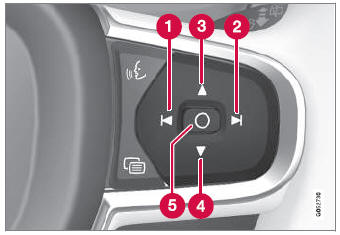
 Decreasing brightness
 Increasing brightness
 Raising position
 Lowering position
 Confirm
The brightness of the graphic is automatically adapted to the light conditions in its background. Brightness is also affected by adjustments to the brightness of the other displays in the vehicle.
The height position can be stored in the front power seat's* memory function using the keypad in the driver's door.
Calibrazione della posizione orizzontale
If the windshield or display unit has been replaced, the head-up display's horizontal position may need to be calibrated. Calibration means that the projected image is rotated clockwise or counterclockwise.
- Toccare Impostazioni nella vista superiore del display centrale.
- Select My Car
 Displays
 Head-Up Display Options
 Head-Up Display Calibration.
- Calibrate the horizontal position of the image using the right-side steering wheel keypad.
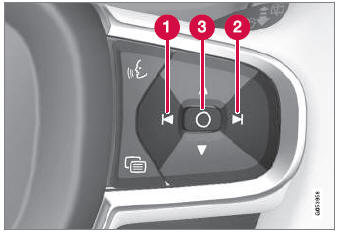
 Rotate counterclockwise
 Rotate clockwise
 Confirm
* Opzione/accessorio.
Mettiti alla prova
Un breve quiz sulla Volvo XC90: ogni risposta ha una spiegazione e un link alla pagina del manuale.