Activation et désactivation de l'affichage tête haute
(Option/accessoire.)
The head-up display can be activated and deactivated when the vehicle has been started.
 Press the Head-Up Display button in the center display's Function view. An indicator light in the button will illuminate when the function is activated.
Réglages de l'affichage tête haute
Réglage des paramètres de l'affichage tête haute.
Settings can be adjusted when the vehicle is started and a projected image is displayed on the windshield.
Sélection des options d'affichage
Sélectionnez les fonctions à afficher sur l'affichage tête haute.
- Appuyez sur Réglages dans la vue supérieure de l'écran central.
- Tap My Car
 Displays
 Head-Up Display Options.
- Select one or more functions:
- Afficher la navigation
- Afficher les informations des panneaux de signalisation
- Afficher l'assistance au conducteur
- Afficher le téléphone
Ce réglage est enregistré comme préférence personnelle dans le profil du conducteur.
Réglage de la luminosité et de la hauteur de l'image

- Appuyez sur le bouton Réglages d'affichage dans la vue Fonctions de l'écran central.
- Adjust the brightness of the projected image and the height position in the driver's field of vision using the right-side steering wheel lever.
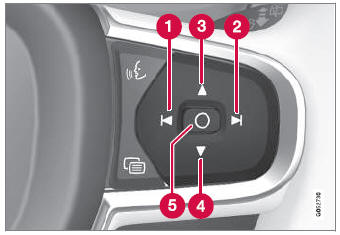
 Decreasing brightness
 Increasing brightness
 Raising position
 Lowering position
 Confirm
The brightness of the graphic is automatically adapted to the light conditions in its background. Brightness is also affected by adjustments to the brightness of the other displays in the vehicle.
The height position can be stored in the front power seat's* memory function using the keypad in the driver's door.
Étalonnage de la position horizontale
If the windshield or display unit has been replaced, the head-up display's horizontal position may need to be calibrated. Calibration means that the projected image is rotated clockwise or counterclockwise.
- Appuyez sur Réglages dans la vue supérieure de l'écran central.
- Select My Car
 Displays
 Head-Up Display Options
 Head-Up Display Calibration.
- Calibrate the horizontal position of the image using the right-side steering wheel keypad.
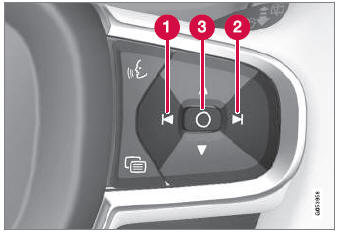
 Rotate counterclockwise
 Rotate clockwise
 Confirm
* Option/accessoire.
Testez-vous
Un quiz rapide sur Volvo XC90 : chaque réponse est expliquée, avec un lien vers la page du manuel.