Driver Support
Selecting and activating Adaptive Cruise Control
In this manual: Driver Support
2steps
~12min
2/5difficulty
Done 0 of 2
(Depending on market, this function may be standard or optional.)
Adaptive Cruise Control (ACC1 ) must first be selected and then activated before it can regulate speed and distance.
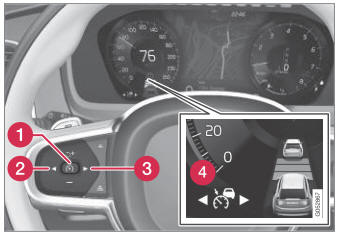
To start the function:
- The driver's seat belt must be fastened and the driver's door must be closed.
- There must be a vehicle ahead (target vehicle) within a reasonable distance or your vehicle's current speed must be at least 15 km/h.
- Press the
 (2) or
 (3) button on the steering wheel keypad and scroll to the Adaptive Cruise Control symbol
 (4).
- Gray symbol - Adaptive Cruise Control is in standby mode.
- When Speed Limiter is selected, press
 (1) on the steering wheel keypad to activate.
- White symbol – Speed Limiter starts and the current speed is stored as the maximum speed.
Reactivating Adaptive Cruise Control to the last stored speed
- When Adaptive Cruise Control is selected, press
 on the steering wheel keypad to activate.
- The Cruise Control marking in the instrument panel will change from GRAY to WHITE and the vehicle will then return to the most recently set speed.
1 Adaptive Cruise Control
Test yourself
A quick Volvo XC90 quiz: every answer comes with an explanation and a link to the manual page.
Was this page helpful?