Driver's seat memory
Description
The memory buttons in the driver's door allow you to store and recall four different seat positions and four different settings for the exterior mirrors*.
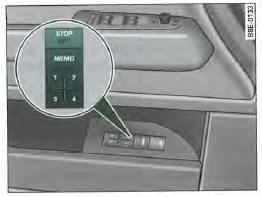
Fig. 93 Driver's door: memory system
Memory buttons
Memory buttons 1, 2, 3 and 4 => fig. 93 are used to store and recall up to four adjustment positions for the driver's seat and exterior mirrors*.
STOP button
Press the STOP button to deactivate it and switch off the seat memory. The OFF indicator next to the STOP button lights up (it is only visible when the headlights are on).
All stored settings are retained. The seat and exterior mirrors* then only allow standard electric adjustment.
We recommend pressing the STOP button and deactivating the memory when the vehicle is only temporarily used by a driver whose seat settings should not be stored.

You can also recall the stored settings using the remote control.
Storing settings
Before you can store your settings, press and engage the STOP button (it must not protrude).
- Adjust the driver's seat
- Adjust both exterior mirrors
- Press and hold the MEMO button.
At the same time, press one of the memory buttons for at least one second.
- Release the buttons. The settings are now stored on the memory button you selected.
Any new programming on the same button erases the position previously stored on it. We recommend starting the button assignment with button 1 and assigning one memory button to each potential driver.
When you lock the vehicle with the remote control (radio key), the last seat and mirror position is stored and assigned to the remote control. When you unlock the vehicle, the mirrors adjust automatically to the last
stored position; the driver's seat does the same when you open the driver's door.
The settings stored on memory buttons 1 to 4 are not erased by this. They can be recalled at any time,
Recalling settings
Stored settings can be recalled either with the memory buttons or with the remote control (radio key).
Selecting via the memory buttons
- If the driver's door is open, briefly press the desired memory button.
- If the driver's door is closed, press the desired memory button until the seat and mirrors have reached the stored position.
Selecting via the remote control
- Unlock your vehicle with the remote control and open the driver's door within 10 minutes.
If you do not open the driver's door within 10 minutes of unlocking the vehicle with the remote control, you must recall the seat setting using the memory buttons.
CAUTION!
- For safety reasons, only recall the seat setting when the vehicle is stationary. Risk of accident!
- In an emergency, the recall process can be interrupted by pressing the STOP button or any memory button.
Assigning remote control keys
To recall stored settings using the remote control key, you must assign a memory button to the key.
Assigning the key to a memory button
- Recall the desired settings (the ones the key is to be assigned to) using the corresponding memory button.
- Press and hold the memory button, and within 10 seconds press the unlock button on the remote control key.
- Release the memory button after about 2 seconds.
Removing the key assignment from a memory button
- Press and hold the MEMO button, and within 10 seconds press the unlock button on the remote control key.
- Release the MEMO button after about 2 seconds.
Each new key assignment replaces the previous one.
We recommend assigning the two factory-supplied remote control keys to memory buttons 1 and 2. If needed, you can obtain two additional remote control keys from an Audi dealer and assign them to memory buttons 3 and 4.
Test yourself
A quick Audi A4 quiz: every answer comes with an explanation and a link to the manual page.