Interior light
The interior lighting system of the BMW 5 Series (7th generation) offers a wide range of functions for comfort and style. From automatic activation of the footwell and entry lights to separate control of the rear reading lights, everything is designed for maximum ease of use. Holding the interior light button for a longer period switches the lighting off permanently, while the ambient light can be adjusted via iDrive. Colors, brightness and night mode can be set individually and are saved per driver profile. The speaker lighting in the Bowers & Wilkins Diamond Surround Sound System can also be adjusted. It responds to muting and underscores the premium character of the vehicle interior, making it ideal for style-conscious drivers.
General
Depending on equipment, the interior light, footwell lights, entry lights, ambient light and speaker lighting are controlled automatically.
Overview
Buttons in the vehicle
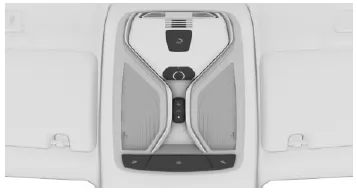
 Interior light
 Reading lights
Switching interior light on/off
 Press the button.
To switch off permanently: press and hold the button for approx. 3 seconds.
The rear interior light can be switched on and off independently. The button is located on the rear roof lining.
Switching reading lights on/off
Press the button.
Depending on equipment, the reading lights are located at the front and in the rear next to the interior light.
Ambient light
General
Depending on equipment, the lighting in the interior can be adjusted for some lights.
If the ambient light has been deactivated via iDrive, it will not switch on when the vehicle is unlocked.
Switching on/off
The ambient light switches on when the vehicle is unlocked and switches off when the vehicle is locked.
Via iDrive:
- "My Vehicle"
- "Vehicle settings"
- "Lights"
- "Interior lighting"
- "Ambient lighting"
The selected setting is saved for the driver profile currently in use.
Select color scheme via iDrive:
- "My Vehicle"
- "Vehicle settings"
- "Lights"
- "Interior lighting"
- "Color"
- Select the desired setting.
Adjust brightness
Via iDrive:
- "My Vehicle"
- "Vehicle settings"
- "Lights"
- "Interior lighting"
- "Brightness"
- Select the desired setting.
Dimmed while driving
Via iDrive:
- "My Vehicle"
- "Vehicle settings"
- "Lights"
- "Interior lighting"
- "Dimmed during night driving"
The lighting in the interior is dimmed for some lights while driving in the dark.
The selected setting is saved for the driver profile currently in use.
Bowers & Wilkins Diamond Surround Sound System
General
Some speakers in the vehicle are illuminated.
The brightness can be set individually.
When the speakers are muted, the speaker lighting is switched off.
Switching on/off
The speaker lighting switches on when the vehicle is unlocked and switches off when the vehicle is locked.
Via iDrive:
- "My Vehicle"
- "Vehicle settings"
- "Lights"
- "Interior lighting"
- "Bowers & Wilkins"
The selected setting is saved for the driver profile currently in use.
Adjust brightness
Via iDrive:
- "My Vehicle"
- "Vehicle settings"
- "Lights"
- "Interior lighting"
- "Brightness"
- Select desired setting
The interior lighting concept of the BMW 5 Series G30/G31 offers a harmonious combination of functionality and elegance. With individually controllable lights, reading lamps and optional ambient lighting, it creates a high-quality interior feel and supports well-being while driving.
The ability to adjust the color and brightness of the ambient light to personal preferences is particularly noteworthy. The Bowers & Wilkins speaker lighting also underscores the premium character of the interior. Everything can be conveniently controlled via iDrive and is saved in the driver profile.
FAQQuestion 1: Can the speaker lighting remain active independently of music playback?
Answer: No, the lighting is deactivated when the speakers are muted.
Question 2: Can the brightness of the ambient light be dimmed automatically during night driving?
Answer: Yes, automatic dimming during night driving can be activated via iDrive.
Test yourself
A quick BMW 5 quiz: every answer comes with an explanation and a link to the manual page.