Traffic information "Traffic info +"
With the "BMW Assist" service activated, you can receive the latest traffic information from "Traffic info +".
Traffic information can be shown on the control display manually. Traffic information is displayed on the route map and is shown automatically during route guidance.
To receive information from "Traffic info +", data reception must be switched on.
1. Open the home screen.
2. Press the controller to go to the menu .
3. Select "Traffic information settings" and press the controller.
4. In the "Professional" navigation system:
select "Traffic information" and press the controller.
In the "Business" navigation system:
select "TMC" and press the controller.
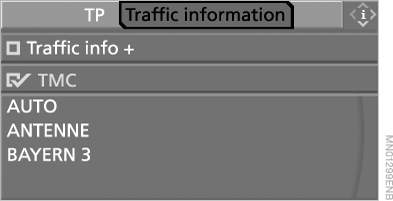
5. Select "Traffic info +" and press the controller.
 Traffic information is received.
Test yourself
A quick BMW X5 quiz: every answer comes with an explanation and a link to the manual page.