My Info
This service allows text messages from the "BMW Assist" home page to be received in the vehicle.
1. Open the "Communication" menu.
2. Select "BMW Assist" and press the controller.
3. Select "My Info" and press the controller.
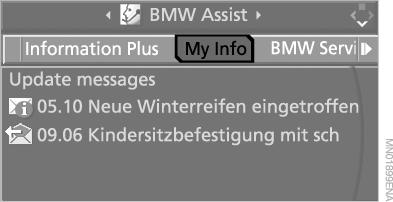
4. To receive and view messages:
► Select "Update messages" and press the controller. Messages are received.
► To view a message, select it and press the controller.
If a message contains a telephone number or address, it can be transferred to the telephone or to the navigation system. The mobile phone must be registered in the vehicle.
No more than ten messages can be shown on the display at one time. To receive new messages, existing messages must first be deleted:
1. Select a message and press the controller.
2. Select "Options" and press the controller.
3. Select "Delete" and press the controller.
Test yourself
A quick BMW X5 quiz: every answer comes with an explanation and a link to the manual page.