Controls
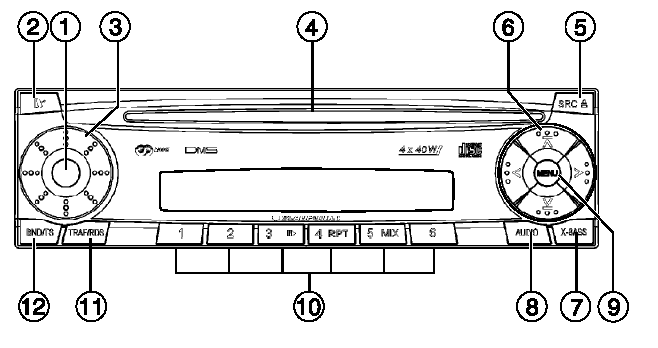
CONTROLS
1. ON / OFF / Mute
2. Press the button to remove the control panel
3. Volume control
4. CD slot
5. SRC/Eject button: Short press – switches audio sources (CD/MP3*, CD changer (if connected)); long press – ejects the CD.
6. Arrow buttons 7. X-Bass, X-Bass level adjustment 8. AUDIO button, used to adjust bass, treble, stereo balance and front-rear balance.
9. MENU button:
• Short press: enter the settings menu;
• long press: start the scan function. 10. Buttons 1-6 11. TRAF-RDS button:
• Short press: turn the traffic information function on/off.
• Long press: turn the RDS function on/off. 12. BND-TS button:
• Short press: select memory banks for FM, AM (MW) and LW bands.
• Long press: start the Travelstore function
Test yourself
A quick Chevrolet Lacetti quiz: every answer comes with an explanation and a link to the manual page.