Remote Control System
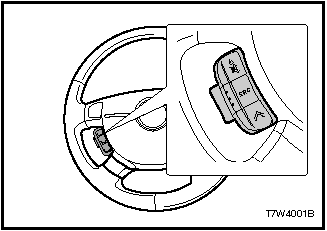
REMOTE CONTROL SYSTEM
POWER Short press: mute or turn the radio on.
Long press: turn the radio off.
MODE SWITCH This switch is used to select the audio source.
Sources are switched in the following order:
Radio Cassette player CD player (CD changer)
VOLUME CONTROL To increase the volume, press “+”. To decrease the volume, press “-”.
SEEK BUTTON Radio Mode Short press:
select next preset memory. Long press: seek radio station forward
Cassette Player Mode (only with electronic control panel) S-CPS seek forward
CD Changer Mode Short press: next CD. Long press: next track.
Some compact discs may not be read or may be read with errors by the car player. This may be caused by a faulty compact disc if the car player is in good condition, or by contamination of the player's optical system.
Damage to the CD player caused by low-quality compact discs or incorrect loading of a disc is not covered by the manufacturer's warranty.
Test yourself
A quick Chevrolet Lacetti quiz: every answer comes with an explanation and a link to the manual page.