Liquid crystal display
Odometer
The odometer, whose display is integrated in the liquid crystal display, performs the mileage totaliser function.
The odometer has 2 operating modes:
- total odometer: total mileage of the vehicle since it was first registered,
- trip odometer: mileage of the vehicle since it was last reset.
Note: Conversion to miles is performed internally by the instrument cluster.
Odometer mode scrolling
To switch from total odometer mode to trip odometer mode (or vice versa), simply press the left button on the instrument cluster once.
Resetting the trip odometer
Note: The trip odometer can be reset at any time, provided +APC is on.
Trip odometer reset procedure:
| STEP | ACTION TO PERFORM |
| 1 | Select trip odometer mode if it is not already active. |
| 2 | Press and hold the left button on the instrument cluster for more than 500 ms. |
| 3 | The trip odometer display flashes. Holding the button for more than 3 seconds resets the trip odometer. |
| 4 | Release the button; the trip odometer display stops flashing and stays steady. The reset is complete. |
Saving distance travelled
The total distance travelled is saved in the instrument cluster and in the BSI.
When +APC is switched on, the BSI reads the distance stored in the instrument cluster and compares it with its own stored mileage.
The BSI and the instrument cluster store the higher of the two values.
Warning: Diagnosis by parts substitution is prohibited (the highest mileage is stored).
Degraded mode
In case of a network communication error or receipt of an invalid value, the trip odometer displays 000 000 kilometres 5 seconds after the fault appears. During these 5 seconds, the displayed value is the last value received by the instrument cluster. This display also applies to the maintenance mode and the oil level mode.
Service indicator
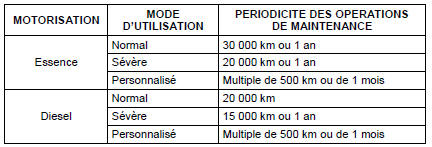
Maintenance operation interval
The maintenance operation interval can be recoded using the following table:
Due date display
At each start-up, the distance remaining before the next maintenance operation is displayed as follows:

The approaching due date is indicated as follows:
| DUE | DISPLAY PERFORMED |
Service due in more than 1000 km |
The service indicator shows the due service for 2 s. |
| The "key" symbol lights up for 2 s, then goes out. | |
Service due in less than 1000 km |
The service indicator shows the due service for 5 s. |
| The "key" symbol flashes for 5 s, then stays on. | |
Mileage service overdue OR time service overdue |
The service indicator shows that a service is overdue. |
| The "key" symbol flashes for 5 s, then stays on. |
Service indicator reset procedure
The service indicator can be reset in one of the following 2 ways:
- using the diagnostic tool,
- using the instrument cluster.
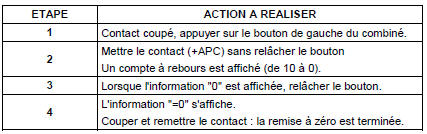
Service indicator reset procedure from the instrument cluster:
Service indicator configuration procedure
The service indicator can only be configured using the diagnostic tool, by remote coding.
Oil level indicator
Normal mode
The oil level is displayed for 10 seconds in place of the total odometer, after the service indicator display sequence.
Note: A long press on the odometer reset switch while the oil level is displayed switches directly to odometer mode.
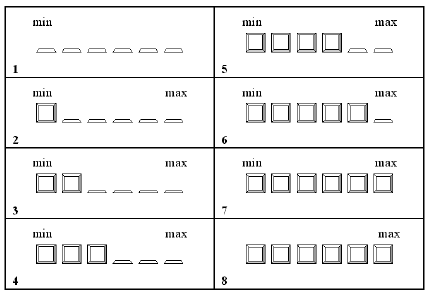
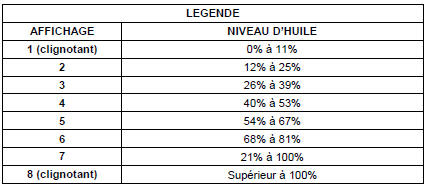
The liquid crystal display shows the oil level as shown in the diagram below:
Degraded mode
If an invalid value is received, the 6 lower segments of the display and the "min" indicator flash, while the "max" indicator stays off.
Note: When the oil level is at minimum, the display behaves as in degraded mode.
Test yourself
A quick Citroen C5 Aircross quiz: every answer comes with an explanation and a link to the manual page.