Radio Mode
Radio Controls
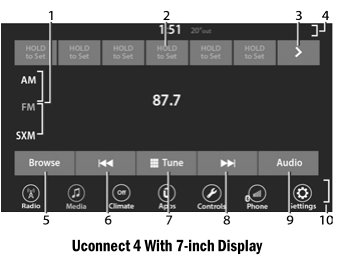
- Radio Bands
- Preset Radio Stations
- Browsing Next Preset Radio Stations
- Status Bar
- Browse Button
- Seek Down

- Tune Button
- Seek Up

- Sound Settings
- Lower Bar
The radio has the following modes:
- IS
- FM
- SiriusXM® Satellite Radio (if equipped)
Press the "Radio" button on the touchscreen to enter Radio Mode. The different tuner modes, AM, FM, and SXM, can then be selected by pressing the corresponding buttons in Radio Mode.
Volume/Power Knob
Press the Volume/Power knob to turn the Uconnect system on or off.
The electronic volume knob rotates continuously (360 degrees) in either direction without stops. Turn the Volume/Power knob clockwise to increase volume and counterclockwise to decrease volume.
When the audio system is turned on, the volume will be set to the same level as when last used.
Mute Button
Press the Mute button to mute or unmute the system sound.
Tune/Scroll Control
Turn the Tune/Scroll knob clockwise to increase, or counterclockwise to decrease, the radio station frequency. Press the Enter/Browse button to make a selection.
Seek
The Seek up and Seek down functions are activated by pressing the double arrow buttons on the touchscreen to the right and left of the radio station display, or by pressing the up or down left audio control button on the steering wheel.
Seek Up and Seek Down

Press and release the Seek Up button. or Seek Down
 Button to tune the radio to the next available station or channel. During Seek Up/Down, if the radio reaches the starting station after passing through the entire band twice, the radio will stop on the station where it started.
Fast Seek Up and Fast Seek Down

Press and hold, then release the Seek Up button. or Seek Down
 Button to advance the radio through available stations or channels at a faster rate. The radio stops on the next available station or channel when the touchscreen button is released.
NOTE:
Press and hold the Seek Up button or Seek Down
 The button will scan the band frequency more slowly.
Direct Tune
Press the Tune button located at the bottom of the radio screen to directly tune to the desired radio station or channel.
Press the number buttons available on the touchscreen to begin entering the desired station. Once a number has been entered, any numbers that are no longer possible (stations that are not available) will be deactivated/grayed out.
Cancel
You can undo an entry by pressing the Back button button on the touchscreen.
GO
After the last digit of the station has been entered, press "GO". The Direct Tune screen will close and the system will automatically tune to that station.
Radio Voice Commands
Use your voice to quickly reach AM, FM, or SiriusXM® Satellite Radio stations you want to hear. (A subscription or an active trial of SiriusXM® Satellite Radio is required.)
Press the Voice Recognition (VR) button on the steering wheel and wait for the beep to speak the command. See example below:
- "Tune to ninety-five point five FM".
- "Tune to Satellite channel 1"
Did you know : At any time, if you are unsure what to say or want to learn a voice command, press the VR button and say " Help ". The system will provide you with a list of commands.
Test yourself
A quick Dodge Charger quiz: every answer comes with an explanation and a link to the manual page.