Steering Wheel Audio Controls
The remote audio system controls are located on the back surface of the steering wheel at the three and nine o'clock positions.
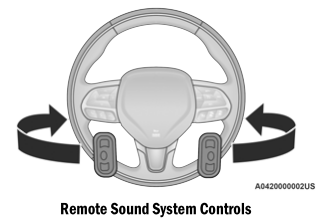
The right control is a rocker switch with a button in the center and controls the volume and audio mode. Pressing the upper part of the rocker switch increases the volume, and pressing the lower part of the rocker switch decreases the volume.
Pressing the center button will switch the radio between the various available modes (AM/FM/SXM or Media, etc.).
The left control is a rocker switch with a button in the center. The functions of the left control vary depending on the mode you are in.
The left-side control operation in each mode is described below:
Radio Operation
Press the upper part of the switch to seek the next available station. Press the lower part of the switch to seek the previous available station.
The button in the center of the left control will tune to the next preset station that you have programmed in the radio settings.
Multimedia Mode
Press the upper part of the switch to go to the next track on the selected media (AUX/USB/Bluetooth®). Double press the switch up to skip forward two tracks. Press the lower part of the switch to go to the beginning of the current track, or to the previous track if within eight seconds of the start of the current track. Double press the lower part of the switch to go to the previous track if more than eight seconds into the current track.
Test yourself
A quick Dodge Charger quiz: every answer comes with an explanation and a link to the manual page.