Radio commands
CD player
You can control playback directly using voice commands.
Diagram
The diagram below shows the available voice commands. The lists below contain further information on the full command menu for selected examples.
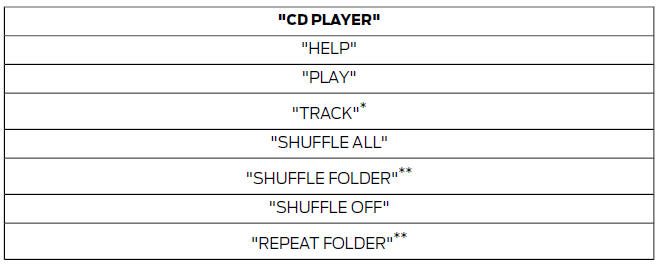

* Can be used as a shortcut.
** Available only when the CD contains audio files, e.g. in MP3 format.
Track
You can select a track directly from the CD.
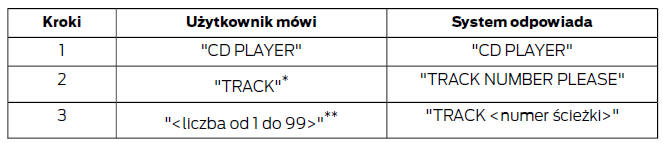
* Can be used as a shortcut.
** In addition, numbers can be spoken as groups of up to four individual digits (e.g. "2", "4", "5" for track 245).
Random playback
To set random playback.

Radio
Radio voice commands allow you to tune radio stations.
Diagram
The diagram below shows the available voice commands. The lists below contain further information on the full command menu.

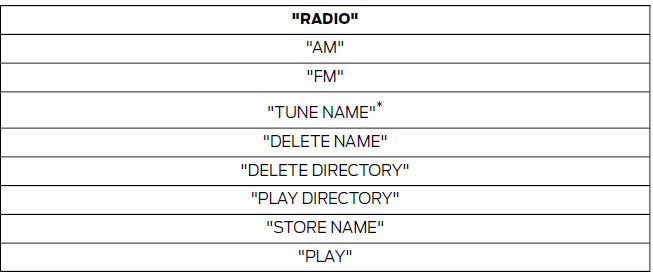
* Can be used as a shortcut.
Tune frequency
This function allows you to tune the radio using voice commands.
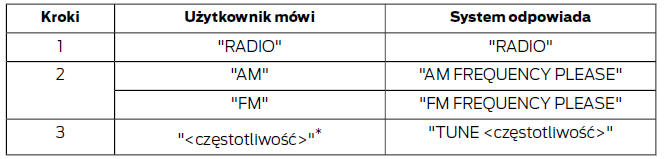
* The frequency can be entered in different ways. Examples are given below.
FM band: 87.5 - 108.0 in steps of 0.1
- "Eighty nine point nine" (89.9)
- "Ninety" (90.0)
- "One hundred point five" (100.5)
- "One zero one point one" (101.1)
- "One zero eight" (108.0)
AM/MW band: 531 - 1602 in steps of 9
AM/LW band: 153 - 281 in steps of 1
- "Five thirty one" (531)
- "Nine hundred" (900)
- "Fourteen forty" (1440)
- "Fifteen zero three" (1503)
- "Ten eighty" (1080)
Store name
Once you have tuned a radio station, you can store its frequency together with a name in the list.
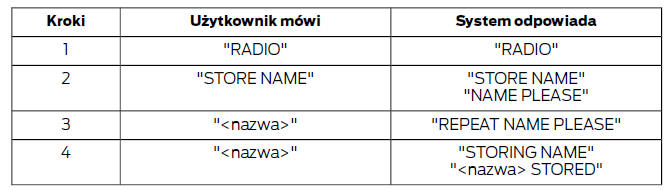
Tune name
This function allows you to call up a stored radio station.

* Can be used as a shortcut.
Delete name
This function allows you to delete a stored radio station.
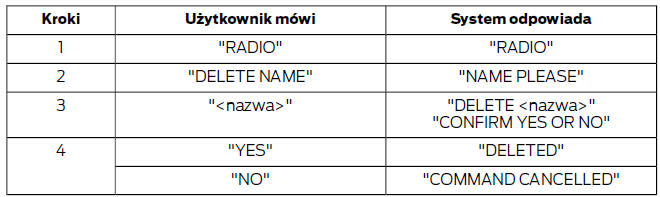
Show list
This function allows the system to show all stored radio stations.

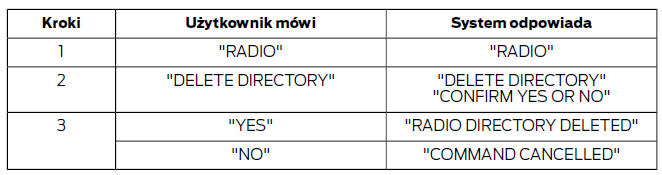
Delete list
This function allows you to delete all stored radio stations at once.
Playback
This function switches the audio source to radio mode.

External sources
This function allows you to switch the audio source to a connected external device.

External devices - USB
These voice commands are used to control an external USB device that can be connected to the audio system.
Diagram
The diagram below shows the available voice commands. The lists below contain further information on the full command menu for selected examples.
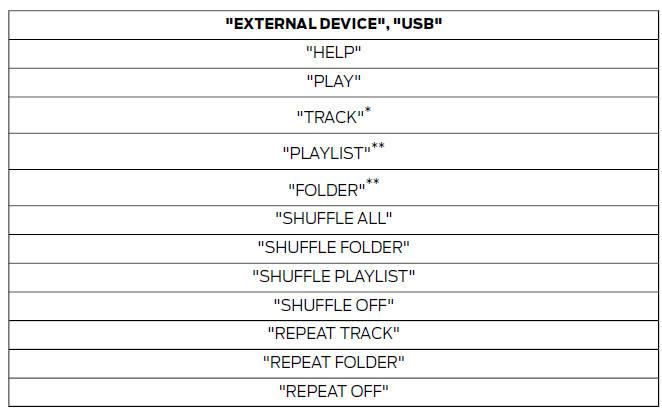
* Can be used as a shortcut.
** Special file names must be assigned to track lists and folders activated by voice control. See General information.
Playback from USB device
This function allows you to switch the audio source to a connected USB device.

Track on USB device
You can select a track directly on the USB device.
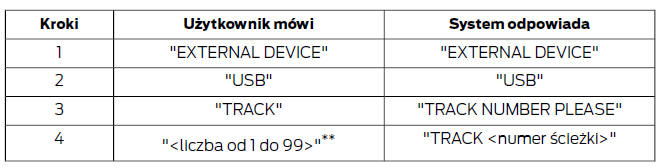
* In addition, numbers can be spoken as groups of up to four individual digits (e.g. "2", "4", "5" for track 245).
External devices - iPod
These voice commands are used to control an iPod that can be connected to the audio system.
Diagram
The diagram below shows the available voice commands. The lists below contain further information on the full command menu for selected examples.
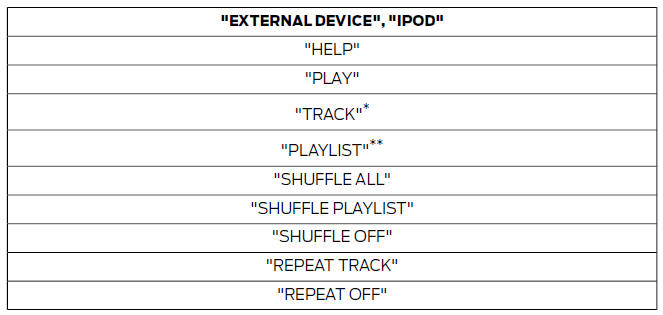
Track on iPod
You can select a track directly from the list of all track titles on the iPod.
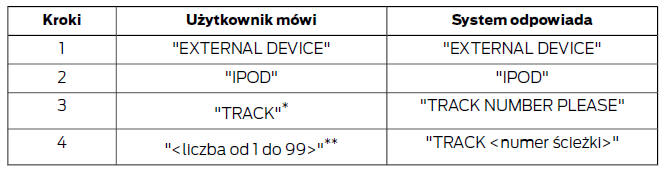
* Can be used as a shortcut.
** In addition, numbers can be spoken as groups of up to five individual digits (e.g. "5", "2", "4", "5", "3" for track 52453), up to the number 65535.
Playlists on the iPod
You can select a playlist directly on the iPod.
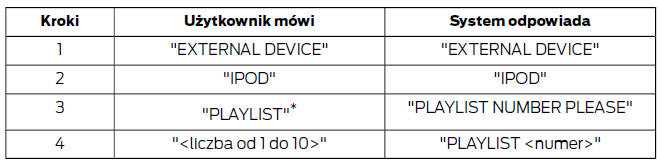
* Special file names must be assigned to playlists activated by voice control. See General Information (page 209).
Test yourself
A quick Ford Fiesta quiz: every answer comes with an explanation and a link to the manual page.