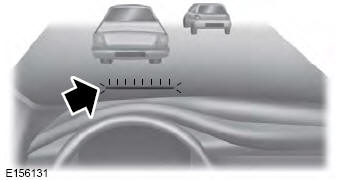
The Pre-Collision Assist system is active at speeds above approximately 3 mph (5 km/h) and pedestrian detection is active at speeds up to 50 mph (80 km/h).
If your vehicle is rapidly approaching a stationary vehicle, a vehicle traveling in the same direction as you, or a pedestrian in your path, the system design provides three levels of functionality:
Alarm
Brake Support
Active Braking
Alert: When active, the system provides a flashing visual warning and an audible warning chime.
Brake Support: The system design helps reduce impact speed by preparing the brakes for rapid braking. The system does not apply automatic brakes. If you depress the brake pedal, the system may apply additional braking up to maximum braking force, even if you apply only light pressure to the brake pedal.
Active Braking: Active braking may activate if the system determines that a collision is unavoidable. The system may help the driver reduce the severity of the impact or avoid the crash completely.
Adjusting Pre-Collision Assist Settings
You can adjust the warning sensitivity to one of three available settings using the information display controls.
If necessary, you can turn off Active Braking using the information display controls.
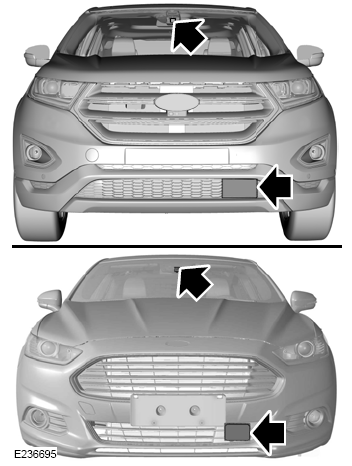
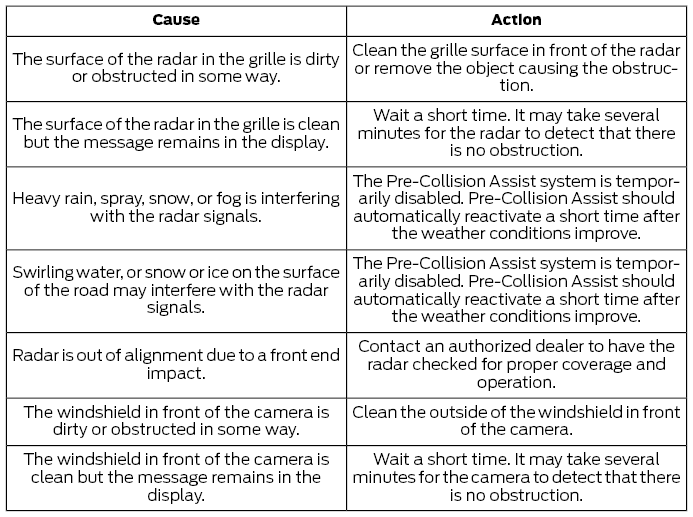
If a sensor blocked or camera blocked message appears in the information display, radar signals or camera images are obstructed. The radar sensor is located behind the driver side lower grille trim panel. With a blocked radar, the Pre-Collision Assist system does not function and cannot detect a vehicle ahead. When the front camera is blocked, the Pre-Collision Assist system does not respond to pedestrians or stationary vehicles, and system performance on moving vehicles is reduced. The following table lists possible causes and actions for when this message appears.
?
Test yourself
A quick Ford Fusion quiz: every answer comes with an explanation and a link to the manual page.