Climate
Touch the lower right corner of the touchscreen to access the climate functions. Depending on the option package and vehicle series, the climate screen may differ from the one shown below.
Note: you can switch between degrees Fahrenheit and degrees Celsius.
See Settings (page 349).
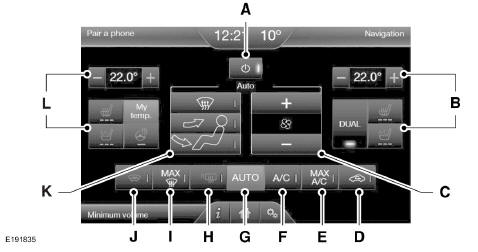
- On/Off: touch this button to turn this system on or off. Outside air cannot enter your vehicle when the system is off.
- Passenger side temperature settings: touch the + or - button to adjust the temperature.
Touch the heated seat icon to turn the heated seat on and off (if equipped).
Touch the temperature-controlled seat icon to turn the temperature-controlled seat on and off (if equipped).
Touch DUAL to activate passenger temperature control.
Note: when the system automatically controls the fan speed, all fan speed indicators turn off.
In addition, recirculated air turns on automatically when you touch the A/C MAX or MAX Defrost buttons, or manually with any airflow mode except defrost. It can also be turned off with all airflow modes except A/C MAX and MAX Defrost to prevent fogging.
Touch this button again to return to normal air conditioning.
The A/C MAX button distributes air through the dashboard vents and helps prevent unwanted odors from entering the vehicle. This mode is more economical and efficient than the A/C mode.
The system automatically determines the fan speed, air distribution, whether the air conditioning is on or off, and whether outside or recirculated air is used.
See Heated Windows and Heated Mirrors (page 121).
Panel: distributes air through the instrument panel vents. Panel and floor: distributes air through the instrument panel vents, the defog vents and the front and rear seat floor vents. Floor: distributes air through the defog vents and the front and rear seat floor vents. Defrost: touch this button to clear fog and frost from the windshield. Touch this button again to return to the previous airflow selection.
When defrost is activated, the system automatically supplies outside air through the windshield defrost vents and the defog vents to help prevent fogging of the windows.
L Touch the heated seat icon to turn the heated seat on and off (if equipped).
Touch the temperature-controlled seat icon to turn the temperature-controlled seat on and off (if equipped).
Touch MyTemp to select the preset temperature. Touch and hold MyTemp to save a new preset temperature.
Touch the heated steering wheel icon to turn the heated steering wheel on and off (if equipped).Smart zone function
Each time you start your vehicle and drive without a front passenger, the heating, ventilation and air conditioning system may automatically switch to single zone mode (if it was previously in dual zone mode) to save fuel. In this case, the DUAL button turns off and the passenger side temperature is set to the driver side temperature.
Press the DUAL button or change the passenger side temperature to activate dual zone mode if there is no passenger. The system remains in dual zone mode until you restart your vehicle.
Activating the function
Press and hold the DUAL button for more than four seconds. To indicate that the function is turned on, only the driver side temperature display flashes.
Deactivating the function
Press and hold the DUAL button for more than four seconds. Both temperature displays flash to indicate that the function is turned off.
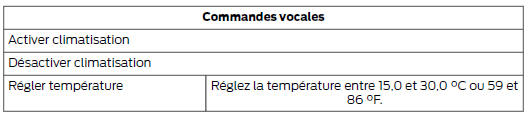
Voice commands for climate control
 Press the
Voice command button on the steering wheel. When the system is ready, say one of the following commands:
Test yourself
A quick Ford Mondeo quiz: every answer comes with an explanation and a link to the manual page.