Information
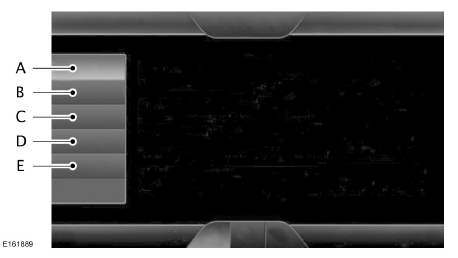
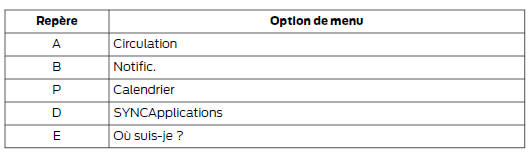
 If your vehicle is equipped with
a navigation system, touch the Information button to access these functions. If your vehicle is not equipped with a navigation system, touch the corner of the touchscreen where the green tab is located.
Notifications
 If your vehicle is equipped with
a navigation system, touch the I (Information) button to access these functions. If your vehicle is not equipped with a navigation system, touch the corner of the touchscreen where the green tab is located.
Press Notifications, then choose from the following services:

This screen displays all system messages (for example, a faulty SD card).
Note: the system signals messages by lighting the information icon yellow. Once the messages have been read or deleted, the icon turns white again.
Calendar
 If your vehicle
is equipped with a navigation system, touch the I (Information) button to access these functions. If your vehicle is not equipped with a navigation system, touch the corner of the touchscreen where the green tab is located.
Touch Calendar. Different views of the current calendar are available: by day, by week or by month.
Emergency Call Assistance (if equipped)
WARNINGS
- For this function to work, your mobile phone must be Bluetooth-enabled and compatible with the system.
- Always place your phone in a safe location inside your vehicle. Failure to follow these instructions may result in serious injury or damage to the phone, which would prevent Emergency Call Assistance from operating correctly.
- If Emergency Assistance is not enabled before a collision, the system will not attempt to call the emergency services, which may delay help and therefore potentially increase the risk of serious or fatal injury. Do not wait for Emergency Assistance to place an emergency call if you are able to do so yourself. Dial the emergency services number immediately to speed up assistance. If Emergency Assistance does not activate within five seconds of the collision, the system or the cellular phone may be damaged or not operational.
Note: before you activate this feature, make sure you read the Emergency Assistance notice and the Emergency Assistance privacy statement later in this section, which contain important information.
Note: when you turn Emergency Assistance on or off, the setting applies to all paired cellular phones. If you turn off Emergency Assistance and a previously paired phone connects when you switch the ignition on, this triggers either a voice message, a message or icon on the screen, or both. Note: each cellular phone works differently. Although Emergency Assistance works with most cellular phones, its use may cause problems with some phones.
In the event of a collision that triggers airbag deployment or fuel pump shut-off, the system can contact emergency services (including the appropriate call center) using a paired and connected cellular phone.
The emergency operator contacts the appropriate police service and connects the three parties (you, the call center and the police service). Finally, the local police service coordinates assistance. Note: in an emergency, and as a communication aid, Emergency Assistance can help you contact specific public safety emergency services. Emergency Assistance does not carry out rescue operations. The local public safety service deploys specific rescue operations depending on the situation.
See Supplementary Restraint System (page 30).
This chapter contains important information about airbag deployment.
See Roadside Assistance in Emergencies (page 222). This chapter contains important information about fuel pump shut-off.
Activating Emergency Assistance

If your vehicle is equipped with a navigation system, touch the I (Information) button to access these functions. If your vehicle is not equipped with a navigation system, touch the corner of the touchscreen where the green tab is located. Then select:


Display Options
When this feature is on, a confirmation message appears on the screen when your phone connects and you start the vehicle.
If you turn this feature off, the dialog box lets you set a reminder.
When the feature is off and a reminder is set, a reminder message appears on the screen and a voice reminder is played when your phone connects and you start the vehicle.
When the feature is off without a reminder set, the system does not play a voice reminder and only displays a reminder message when you connect your phone.
To make sure Emergency Assistance works correctly:
- The system must have power and operate correctly at the time of a collision and while the feature is being turned on and used.
- You must have turned the feature on before the collision.
- You must have a cell phone connected to the system.
- In some countries, a valid, registered and funded SIM card may be required to make an emergency call.
- A connected cell phone must be able to place and maintain an outgoing call at the time of a collision.
- A connected cell phone must have adequate network coverage, a sufficiently charged battery and a strong enough signal.
- Your vehicle battery must be charged.
Note: this feature only works in European regions or countries where the SYNC Emergency Assistance feature can call local emergency services.
Visit the Ford website for your region for more details.
In the Event of a Collision
Note: not all collisions trigger airbag deployment or fuel pump shut-off (which may trigger Emergency Assistance). However, if Emergency Assistance is triggered, the system attempts to contact emergency services. If the connected cellular phone is damaged or has disconnected from the system, the system searches for and attempts to connect to one of the previously paired cellular phones. The system attempts to dial 112.
Before the call:
- If you do not cancel the call and it connects, an introductory message is read to the emergency operator.
During the call:
- Emergency Assistance uses information provided by the vehicle's GPS or cellular network, when available, to determine which language to use.
- The language the system uses to interact with your vehicle occupants may differ from the language used to deliver the relevant information to the emergency operator.
- Once the introductory message has been delivered, the phone line opens so you can speak hands-free with the emergency operator.
- As soon as the line connects, be ready to immediately give your name, your phone number and your location.
Note: while providing information to the emergency services operator, the system plays a message indicating that it is transmitting important information. It then tells you when the line is open so that hands-free communication can begin. Note: during an SOS Emergency Assistance call, a priority emergency screen is displayed. It contains the GPS coordinates of the vehicle if they are available. Note: GPS location information may not be available at the time of the collision, in which case SOS Emergency Assistance still attempts to place an emergency call. Note: emergency services may not receive the GPS coordinates, in which case hands-free communication with an emergency operator is available. Note : the emergency operator may also receive information from the mobile phone network, such as the mobile phone number, the location of the mobile phone and the name of the mobile phone service provider, regardless of SYNC SOS Emergency Assistance.
SOS Emergency Assistance may not work if:
- your mobile phone or SOS Emergency Assistance equipment was damaged during the accident;
- the vehicle battery or system power supply is cut off
- your mobile phone is ejected from the vehicle during a collision;
- you do not have a valid, registered SIM card with credit in your mobile phone;
- you are in a country or region in Europe where the SYNC SOS Emergency Assistance function cannot place the call. Visit the Ford website for your region for more details.
Important Information About SOS Emergency Assistance
At present, SOS Emergency Assistance does not call emergency services in the following countries: Albania, Belarus, Bosnia and Herzegovina, North Macedonia, Netherlands, Ukraine, Moldova and Russia.
Visit the Ford website for your region for the most up-to-date information.
SOS Emergency Assistance Privacy Statement
When you activate SOS Emergency Assistance, it may inform emergency services that your vehicle has been involved in a collision in which an airbag has deployed or the fuel supply has been shut off.
This feature can provide your location information to the emergency operator, as well as other details about your vehicle or the collision, to help them determine the most appropriate emergency services.
If you do not want this information shared, turn the feature off.
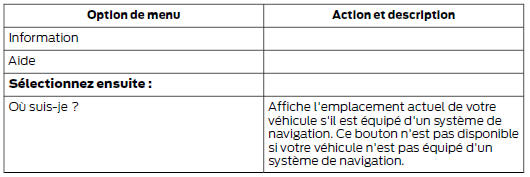
Where am I? To get information about your vehicle's location, select:
Test yourself
A quick Ford Mondeo quiz: every answer comes with an explanation and a link to the manual page.