Electric Vehicle Information
 Your system is
equipped with electric vehicle-specific screens that display power flow information.
To access these screens, press the EV Info button.
Power
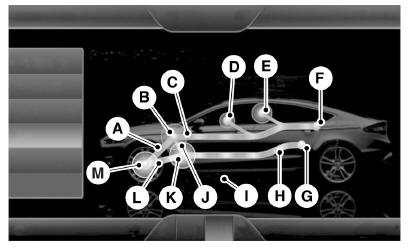
- Motor/wheel flow: shows the direction of power flow between the wheels and the electric motor.
- Electric motor: represents the hybrid electric motor. The higher the motor output, the wider the circle around the node. The motor node lights up to indicate that the vehicle is ready to drive.
- Battery/motor flow1: shows the direction of power flow between the high-voltage battery and the electric motor. If the flow points toward the motor, the battery is supplying the power needed to accelerate the vehicle (discharging the battery). If the flow points toward the battery, the electric motor is supplying power to charge the battery (charging the battery).
- Other2: includes all power-consuming accessories, including low-voltage accessories such as the A/C fan, headlights and heated seats. The more power these accessories use, the larger the circle around the node. This node lights up whenever the vehicle is switched on because low levels of power are always being used.
- Air conditioning2,3: includes the power consumption of high-voltage air conditioning components, such as the electric A/C compressor.
The more power these components use, the larger the circle around the node.
1Battery/motor flow includes the battery power used to accelerate the vehicle. It does not include energy used by the vehicle for accessories (such as air conditioning, headlights and radio). This screen shows accessory and air conditioning usage separately.
2 Other: indicates the electrical power requirements needed to operate the vehicle's accessory systems. Accessories use power but do not contribute to moving the vehicle. The power flow shows the power used by the air conditioning system and other accessories separately.
3The air conditioning system may consider air conditioning to be required even if you have switched it off. In this case, you may see some power being used by the air conditioning, even though it is switched off.

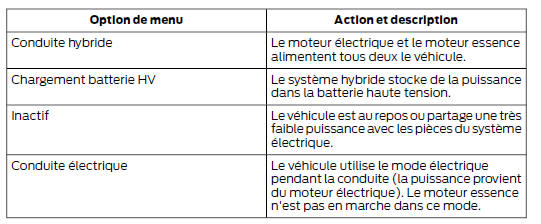
Status
Shows the active mode of the vehicle system.
Test yourself
A quick Ford Mondeo quiz: every answer comes with an explanation and a link to the manual page.