Features
Displaying Messages
In this manual: Features
10steps
~60min
3/5difficulty
Done 0 of 10
Displaying text messages

- Go to the Phone menu screen.
- Select Text/Email.
- Select account if necessary.
- Select a message.
- The text message is displayed. The system automatically starts reading the message aloud.
Displaying Messages
The icon appears next to an unread message. If you delete a message on the phone, the message is also deleted in the system. If you send a message from the system, the message goes to your phone's outbox.
To see the previous or next message, select  (previous) or
 (next) on the message screen.
Displaying e-mail messages
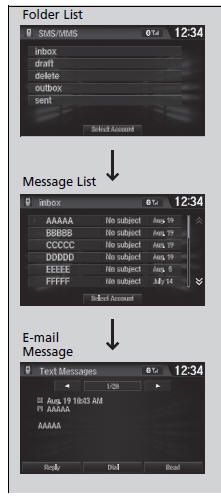
- Go to the Phone menu screen.
- Select Text/Email.
- Select Select Account if necessary.
- Select a folder.
- Select a message.
- The e-mail message is displayed. The system automatically starts reading the message aloud.
Read or Stop reading a message
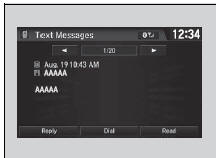
- Go to the text or e-mail message screen.
- The system automatically starts reading the message aloud.
- Select Stop to stop reading.
Select Read again to start reading the message from the beginning.
Reply to a message
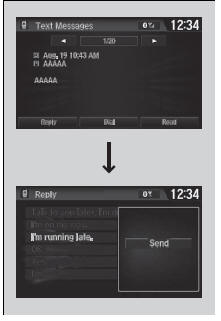
- Go to the text or e-mail message screen.
- The system automatically starts reading the message aloud.
- Select Reply.
- Select the reply message.
- The pop-up menu appears on the screen.
- Select Send to send the message.
- Complete appears on the screen when the reply message was successfully sent.
Reply to a message
The available fixed reply messages are as follows:
- Talk to you later, I'm drivin.
- I'm on my way.
- I'm running late.
- OK
- Yes
- No
Only certain phones receive and send messages when paired and connected. For a list of compatible phones:
- U.S.
- Canada
Making a call to a sender
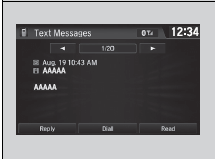
- Go to the text message screen.
- Select Dial.
Test yourself
A quick Honda Civic quiz: every answer comes with an explanation and a link to the manual page.
Was this page helpful?