Features
Making a Call
In this manual: Features
15steps
~90min
4/5difficulty
Done 0 of 15
You can make calls by inputting any phone number, or by using the imported phonebook, call history, speed dial entries, or redial.
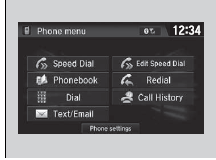
Making a Call
Any voice-tagged speed dial entry can be dialed by voice from most screens. Press the button and say the voice tag name. Once a call is connected, you can hear the voice of the person you are calling through the audio speakers.
While there is an active connection with Apple CarPlay, phone calls cannot be made with HandsFreeLink and are only made from Apple CarPlay.
To make a call using the imported phonebook
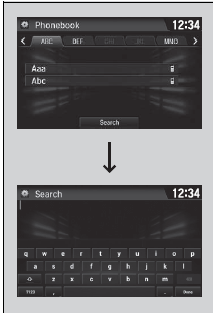
- Go to the Phone menu screen.
- Select Phonebook.
- Select a name.
- You can also search by letter. Select Search.
- Use the keyboard on the touch screen for entering name, if multiple numbers exist select a number.
- You can also swipe up or down to scroll through the list of contacts alphabetically on the steering wheel.
- Select a number.
- Dialing starts automatically.
To make a call using a phone number
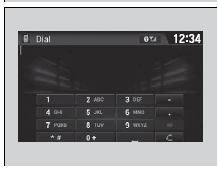
- Go to the Phone menu screen.
- Select Dial.
- Select a number.
- Use the keyboard on the touch screen for entering numbers.
- Select
 .
- Dialing starts automatically.
To make a call using redial
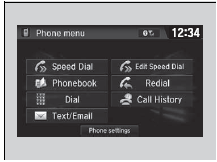
- Go to the Phone menu screen.
- Select Redial.
- Dialing starts automatically.
To make a call using the Call History

Call history is stored by All, Dialed, Received, and Missed.
- Go to the Phone menu screen.
- Select Call History.
- Select All, Dialed, Received, or Missed.
- Select a number.
- Dialing starts automatically.
To make a call using the Call History
The call history displays the last 20 all, dialed, received, or missed calls.(Appears only when a phone is connected to the system.)
To make a call using a Speed Dial entry
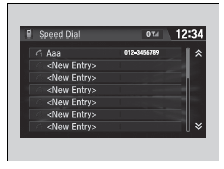
- Go to the Phone menu screen.
- Select Speed Dial.
- Select a number.
- Dialing starts automatically.
To make a call using a Speed Dial entry
When a voice tag is stored, press the button to call the number using the voice tag.
Press the button and follow the prompts.
Test yourself
A quick Honda Civic quiz: every answer comes with an explanation and a link to the manual page.
Was this page helpful?