Features
Receiving a Call
In this manual: Features
~1min read
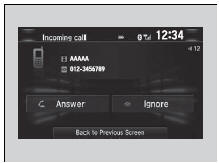
When there is an incoming call, an audible notification sounds (if activated) and the Incoming call screen appears.
Press the  button to answer the call.
Press the  button to decline or end the call.
Receiving a Call
Call Waiting
Press the button to put the current call on hold to answer the incoming call. Press the
 button again to return to the current call. Select Ignore to ignore the incoming call if you do not want to answer it. Press the
 button if you want to hang up the current call.
You can select the icons on the audio/information screen instead of the  and
 buttons.
Test yourself
A quick Honda Civic quiz: every answer comes with an explanation and a link to the manual page.
Was this page helpful?