Features
Options During a Call
In this manual: Features
~1min read
The following options are available during a call.
Mute: Mute your voice.
Transfer: Transfer a call from the system to your phone.
Touch Tones: Send numbers during a call. This is useful when you call a menudriven phone system.
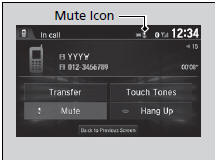
The available options are shown on the lower half of the screen.
Select the option.
- The mute icon appears when Mute is selected. Select Mute again to turn it off.
Options During a Call
Touch Tones: Available on some phones.You can select the icons on the audio/information screen.
Test yourself
A quick Honda Civic quiz: every answer comes with an explanation and a link to the manual page.
Was this page helpful?