Features
To Set Up Text/E-mail Message Options
In this manual: Features
4steps
~24min
2/5difficulty
Done 0 of 4
To turn on or off the text/e-mail function
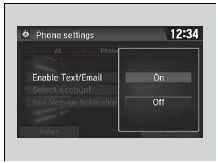
- Go to the phone settings screen.
- Select the Text/Email tab, then Enable Text/Email.
- A pop-up menu appears on the screen.
- Select On or Off.
To turn on or off the text/e-mail function
To use the text/e-mail message function, it may be necessary to set up on your phone.
To turn on or off the text/e-mail notice
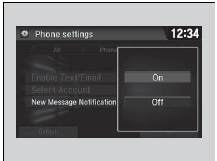
- Go to the phone settings screen.
- Select the Text/Email tab, then New Message Notification.
- A pop-up menu appears on the screen.
- Select On or Off.
To turn on or off the text/e-mail notice
On: A pop-up notification comes on every time you receive a new message.Off: The message you receive is stored in the system without notification.
Test yourself
A quick Honda Civic quiz: every answer comes with an explanation and a link to the manual page.
Was this page helpful?