Features
Selecting a Mail Account
In this manual: Features
2steps
~12min
1/5difficulty
Done 0 of 2
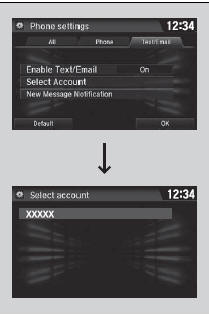
If a paired phone has text or mail message accounts, you can select one of them to be active and receive notifications.
- Go to the phone settings screen.
- Select the Text/Email tab, then Select Account.
- A pop-up menu appears on the screen.
- Select Text Messages or an e-mail account you want.
Selecting a Mail Account
You can also select a mail account from the folder list screen or the message list screen.
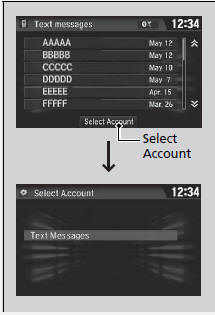
You can only receive notifications from one text or mail message account at a time.
Test yourself
A quick Honda Civic quiz: every answer comes with an explanation and a link to the manual page.
Was this page helpful?