Features
Speed Dial
In this manual: Features
17steps
~102min
4/5difficulty
Done 0 of 17

Up to 20 speed dial numbers can be stored per phone.
To store a speed dial number:
- Go to the Phone menu screen.
- Select Speed Dial.
- Select New Entry.
From Import from Call History:
- Select a number from the call history.
From Manual Input:
- Input the number manually.
From Import from Phonebook:
- Select a number from the connected cell phone's imported phonebook.
- When the speed dial is successfully stored, you are asked to create a voice tag for the number. Select Yes or No.
- Select Record, or use the
 button and follow the prompts to complete the voice tag.
Speed Dial
When a voice tag is stored, press the  button to call the number using the voice tag. Say the voice tag name.
To add a voice tag to a stored speed dial number
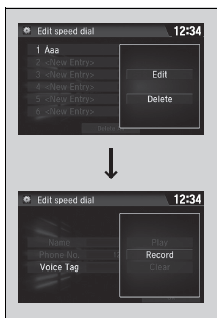
- Go to the phone settings screen.
- Select Edit Speed Dial.
- Select an existing speed dial entry.
- From the pop-up menu, select Edit.
- Select Voice Tag.
- From the pop-up menu, select Record.
- Select Record, or use the
 button and follow the prompts to complete the voice tag.
To delete a voice tag

- Go to the phone settings screen.
- Select Edit Speed Dial.
- Select an existing speed dial entry.
- From the pop-up menu, select Edit.
- Select Voice Tag.
- From the pop-up menu, select Clear.
- A confirmation message appears on the screen. Select Yes.
Speed Dial
Avoid using duplicate voice tags. Avoid using "home" as a voice tag. It is easier for the system to recognize a longer name.For example, use "John Smith" instead of "John."
To edit a speed dial

- Go to the phone settings screen.
- Select Edit Speed Dial.
- Select an existing speed dial entry.
- From the pop-up menu, select Edit.
- Select a setting you want.
To delete a speed dial
- Go to the phone settings screen.
- Select Edit Speed Dial.
- Select an existing speed dial entry.
- From the pop-up menu, select Delete.
- A confirmation message appears on the screen. Select Yes.
Test yourself
A quick Honda Civic quiz: every answer comes with an explanation and a link to the manual page.
Was this page helpful?