Features
Phonebook Phonetic Modification
In this manual: Features
36steps
~216min
4/5difficulty
Done 0 of 36
Add phonetic modifications or a new voice tag to the phone's contact name so that it is easier for HFL to recognize voice commands.
To add a new voice tag
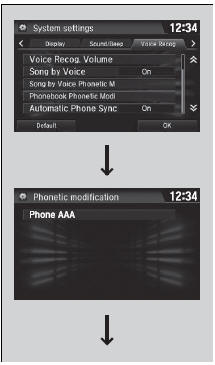
- Select
 .
- Select Settings.
- Select System.
- Select the Voice Recog tab.
- Select Phonebook Phonetic Modification.
- Select the phone you want to add phonetic modification to.
Phonebook Phonetic Modification
You can store up to 20 phonetic modification items.
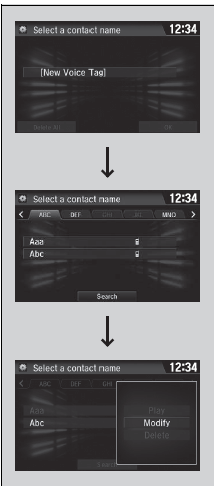
- Select New Voice Tag.
- Select a contact name you want to add to.
- The pop-up menu appears on the screen.
- Select Modify.
- Using Record or the
 button, follow the prompts to complete the voice tag.
- You will receive a confirmation message on the screen, then select OK.
To modify a voice tag
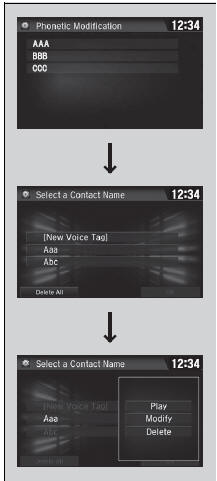
- Select
 .
- Select Settings.
- Select System.
- Select the Voice Recog tab.
- Select Phonebook Phonetic Modification.
- Select the phone you want to modify phonetic modification.
- Select a contact name you want to modify.
- The pop-up menu appears on the screen.
- Select Modify.
- Using Record or the
 button, follow the prompts to complete the voice tag.
- You will receive a confirmation message on the screen, then select OK.
Phonebook Phonetic Modification
You can only modify or delete contact names for the currently connected phone.
To delete a modified voice tag

- Select.
- Select Settings.
- Select System.
- Select the Voice Recog tab.
- Select Phonebook Phonetic Modification.
- Select the phone you want to delete phonetic modification.
- Select a contact name you want to delete.
- The pop-up menu appears on the screen.
- Select Delete.
- The selected contact name has been selected.
- Select OK.
To delete all modified voice tags
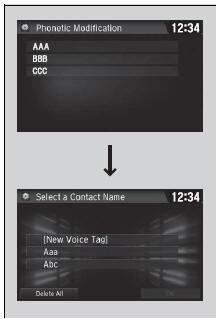
- Select.
- Select Settings.
- Select System.
- Select the Voice Recog tab.
- Select Phonebook Phonetic Modification.
- Select the phone you want to delete phonetic modification.
- The contact name list appears.
- Select Delete All.
- You will receive a confirmation message on the screen, then select Yes.
Test yourself
A quick Honda Civic quiz: every answer comes with an explanation and a link to the manual page.
Was this page helpful?