Door Locks from Outside the Vehicle
Mechanical Key
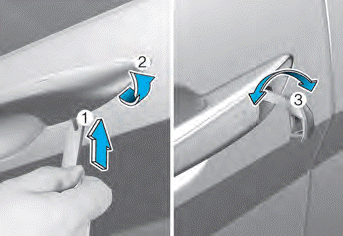
1. Press the lever located under the mechanical key cover. (1)
2. While pressing the lever so the mechanical key does not come out of the cover hole, slowly pull the cover toward the rear of the vehicle and remove it. (2)
3. After removing the cover, only the driver's door can be locked or unlocked with the mechanical key.
4. Turn the key toward the rear of the vehicle to lock and toward the front of the vehicle to unlock. (3)
When you lock/unlock the driver's door with the key, the driver's door will lock/unlock automatically.
After the door is unlocked, it can be opened by pulling the door handle.
When closing the door, push on the door by hand. Make sure the doors are closed securely.
Information
Be careful when closing the door. When operating the mechanical key, only the driver's door can be locked/unlocked.
When all doors are locked with the mechanical key, lock all doors using the central door lock switch inside the vehicle. Open the driver's side door from the inside using the door handle, then close the door and lock the driver's door using the mechanical key operation.
Refer to Chapter 5, "Door Lock Operation from Inside the Vehicle", to lock from inside the vehicle.
Information
When removing the cover, be careful not to lose the cover or scratch it.
When the key cover is frozen and does not open, lightly touch it or indirectly warm it (hand temperature, etc.).
Do not apply excessive force to the door and door handle. It may be damaged.
Remote Key
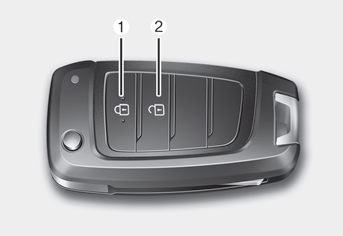
To lock the doors, press the Door Lock button (1) on the remote key.
To unlock the doors, press the Door Unlock button (2) on the remote key.
Once the doors are unlocked, they can be opened by pulling the door handle.
When closing the door, push on the door by hand. Make sure the doors are closed securely.
Smart Key
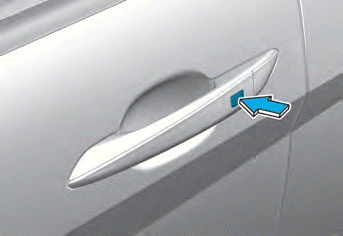
To lock the doors, press the button on the outside door handle while carrying the smart key, or press the door lock button on the smart key.
To unlock the doors, press the button on the outside door handle while carrying the smart key, or press the door unlock button on the smart key.
Once the doors are unlocked, they can be opened by pulling the door handle.
When closing the door, push on the door by hand. Make sure the doors are closed securely.
Information
- In cold and humid climates, the door lock and door mechanisms may not operate properly due to freezing conditions.
- If the door is locked/unlocked several times in quick succession with the vehicle key or door lock switch, the system may temporarily stop operating to protect the circuit and prevent damage to system components.
- The two-press unlock setting can be changed in the User Settings mode on the cluster.
Test yourself
A quick Hyundai Elantra CN7 quiz: every answer comes with an explanation and a link to the manual page.