Smart Cruise Control System
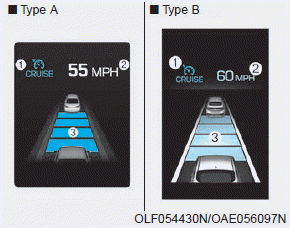
➀ CRUISE indicator
➁ Set speed
➂ Distance to vehicle ahead
To display the SCC screen on the LCD in the cluster, select SCC/LKA mode ( ) for Cluster Type A, or ASSIST mode (
 ) for Cluster Type B. For more information, refer to "LCD Modes" in Chapter 3.
The Smart Cruise Control system allows you to program the vehicle to maintain a constant speed and a minimum distance from the vehicle ahead.
The Smart Cruise Control system automatically adjusts your vehicle's speed to maintain the programmed speed and following distance, without requiring you to press the accelerator or brake pedal.
WARNING
For your safety, read the owner's manual before using the Smart Cruise Control system.
WARNING
The Smart Cruise Control system does not replace safe driving practices; it is a convenience feature only. The driver is always responsible for checking speed and the distance to the vehicle ahead.
WARNING
Observe the following precautions:
- Always set the vehicle speed below the speed limit.
- If Smart Cruise Control remains on (the Cruise (
 ) indicator is illuminated on the instrument cluster), Smart Cruise Control may be activated unintentionally. Keep the Smart Cruise Control system off (Cruise (
 ) indicator off) when not using Smart Cruise Control to avoid unintentionally setting a speed.
- Use the Smart Cruise Control system only when driving on open highways in good weather.
- Do not use Smart Cruise Control when it may be unsafe to drive the vehicle at a constant speed:
- In heavy traffic or when road conditions make it difficult to keep a constant speed
- On wet, icy, or snow-covered roads
- On steep downhill or uphill grades
- In windy areas
- In parking lots
- When driving near guardrails
- On sharp curves
- When visibility is limited (for example, due to fog, snow, rain, or sandstorms)
- When the vehicle's detection capability is reduced by vehicle modifications that cause a change in height at the front or rear of the vehicle
Test yourself
A quick Hyundai Ioniq quiz: every answer comes with an explanation and a link to the manual page.