Door Locks from Inside the Vehicle
With Door Lock Button
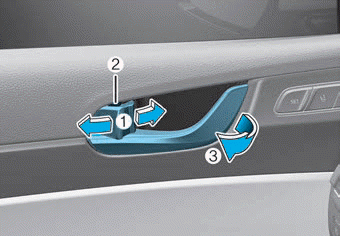
- To open the door, push the door lock button (1) to the "Unlock" position. The red mark (2) on the door lock button will be visible.
- To lock the door, push the door lock button (1) to the "Lock" position. If the door is locked properly, the red mark (2) on the door lock button will not be visible.
- To open the door, pull the door handle (3) outward.
- If the inside door handle of the driver's door or front passenger's door is pulled when the door lock button is in the locked position, the button will unlock and the door will open.
- For vehicles with a start key (with remote key): The front doors cannot be locked if the remote key is in the ignition switch and any of the front doors is open.
- For vehicles with a push button start (with smart key): The doors cannot be locked if the smart key is inside the vehicle and any of the doors is open.
Information
If the power door lock stops working while you are inside the vehicle, try one or more of the following methods to get out:
- Use the door unlock function repeatedly (both electrically and manually) while pulling the door handle.
- Open other door locks and handles at the front and rear.
- Lower the front window and use the mechanical key to unlock the door from the outside.
Information
When the vehicle battery is discharged and you exit the vehicle, make sure all doors are locked. You can lock the driver's door with the key and the other doors with the lock button above the inside door handle.
With Central Door Lock Switch
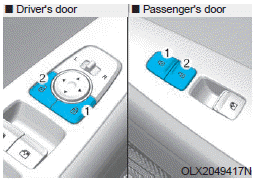
On the driver's and front passenger's side, the armrest of the side door is equipped with the central door lock switch. The lock button is marked with the ( ) symbol. The unlock button is marked with the ( ) symbol.
When the lock button (1) is pressed, all vehicle doors will lock.
When the unlock button (2) is pressed, all vehicle doors will unlock.
- For vehicles with a start key (with remote key): If the key is in the ignition switch and any door is open, the doors will not lock even if the lock button (2) is pressed.
- For vehicles with a push button start (with smart key): If the smart key is in the vehicle and any door is open, the doors will not lock even if the lock button (2) is pressed.
WARNING
- Doors must always be fully closed and locked while the vehicle is in motion. If the doors are unlocked, the risk of being thrown from the vehicle in an accident increases.
- Do not pull the inside door handle of the driver's or passenger's door while the vehicle is moving.
WARNING
Never leave children or animals unattended in your vehicle. A closed vehicle can become extremely hot, which may result in death or serious injury to unattended children or animals who cannot leave the vehicle. Children may operate vehicle functions that could injure them, or they may encounter other hazards, possibly from someone gaining access to the vehicle.
WARNING
Always secure your vehicle.
Leaving your vehicle unlocked increases the potential risk to you or others of someone hiding in your vehicle. To secure your vehicle, while pressing the brake pedal, press the P (Park) button, apply the parking brake and turn the ignition switch to the LOCK/OFF position, close all windows, lock all doors and always take the key with you.
CAUTION
Opening a door when something is approaching may result in damage or injury. Be careful when opening the doors and observe vehicles, motorcycles, bicycles, or pedestrians approaching the vehicle on the way to the door.
WARNING
If you remain in the vehicle for a long time while the weather is very hot or cold, there is a risk of injury or danger to life. Never lock the vehicle from the outside when someone is inside the vehicle.
Test yourself
A quick Hyundai Palisade quiz: every answer comes with an explanation and a link to the manual page.