Integrated Memory System
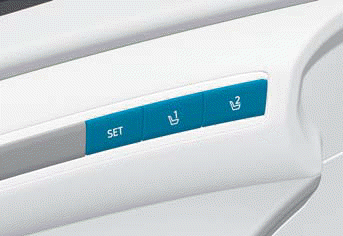
The Integrated Memory System for the driver's seat is equipped on some models and allows the driver to store and recall the driver's seat position.
WARNING
Never attempt to operate the Integrated Memory System while the vehicle is moving.
Information
- If the battery is disconnected, the memory settings will be erased.
- If the Integrated Memory System does not operate normally, contact an authorized HYUNDAI dealer.
Storing Memory Positions
1. Make sure the ignition switch is in the ON position and the shift lever is in the P (Park) position.
2. Adjust the driver's seat to the desired position.
3. Press the SET button. The system will beep once and prompt you to press the memory button on the instrument cluster display.
4. Press one of the memory buttons (1 or 2) within 4 seconds. The system beeps twice when the settings are stored successfully.
5. The message "Driver 1 (or 2) settings saved" appears on the cluster display.
Recalling Memory Positions
1. Make sure the ignition switch is in the ON position and the shift lever is in the P (Park) position.
2. Press the desired button (1 or 2). The system beeps once and the driver's seat position is automatically adjusted to the stored position.
3. The message "Driver 1 (or 2) settings applied" appears on the cluster display.
Information
- If you press the SET button or the memory button (1 or 2) for which settings are recalled, IMS is temporarily deactivated. If you press the SET button or the number 1 button while the number 1 setting is in operation, IMS is temporarily deactivated. If you press button 2, the IMS memory settings for number 2 are activated.
- If you adjust the driver's seat settings while IMS is adjusting the seat and mirrors, the system stops the adjustments.
Resetting the Integrated Memory System
1. Make sure the shift lever is in the P (Park) position and the engine is running, then open the driver's door.
2. Move the driver's seat to the fully rearward and upright position.
3. Press and hold the SET button and the driver's seat movement switch.
When resetting the Integrated Memory System
A notification sound will sound, and the seat is adjusted to the maximum-reward position. Then the seat and seatback move to the default center position.
The reset procedure and notification sound may stop if:
- The memory button is pressed.
- The seat control switch is operated.
- The transmission is shifted out of P (Park).
- The vehicle speed exceeds 2 mph (3 km/h).
- The driver's door is closed.
Information
- If seat movement or the notification sound stops before the process is complete, restart the reset procedure.
- Before resetting IMS, make sure there are no objects on or around the driver's seat.
Seat Easy Access Operation
The system moves the driver's seat automatically as follows:
Vehicles equipped with Driver's Power Seat and smart key
- The driver's seat moves rearward when the Start/Stop button is pressed to the OFF position.
- The driver's seat moves forward when the Start/Stop button is pressed to the ACC or START position.
The Seat Easy Access function may be limited when the driver's seat position is already close to the maximum rearward position.
You can turn the Seat Easy Access function on or off in the settings menu on the instrument cluster or the infotainment system on some models.
- User Settings > Convenience > Seat Easy Access > Off/Normal/Extended (for cluster type)
- Setup > Vehicle > Seat > Seat Easy Access > Normal/Extended/Off (for infotainment system type)
Information
- For more information on the cluster settings menu, refer to the "Cluster Display" section in Chapter 4.
- The infotainment system may change after a software update. For more information, refer to the infotainment system user's manual and quick reference guide.
WARNING
To avoid injury or property damage, make sure there are no objects or passengers in the rear seat or driver's seat area before moving the seat. To stop the seat movement, press the SET button or any of the driver's seat control switches.
Test yourself
A quick Hyundai Tucson LM quiz: every answer comes with an explanation and a link to the manual page.