Rear Occupant Alert (ROA)
Rear occupant alert: Prevents the driver from leaving the vehicle when a rear passenger remains in the vehicle.
Rear Occupant Alert Settings
To use the Rear Occupant Alert system, it can be enabled in the settings menu on the instrument cluster or the infotainment system.
Select:
- User Settings > Convenience > Rear Occupant Alert (for cluster type)
- Setup > Vehicle > Convenience > Rear Occupant Alert (for infotainment system type)
Rear Occupant Alert
- First Alert
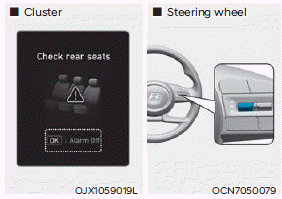
When the engine is turned off and the driver's door is opened, after opening and closing the rear door or tailgate, the warning message "Check Rear Seats" appears on the instrument cluster.
- Second Alert
After the first alert, the second alert operates when any movement is detected in the vehicle after the driver's door is closed and all doors are locked. The horn sounds for approximately 25 seconds. If the system continues to detect movement, the alert operates up to 8 times. Unlock the doors with the smart key to stop the alarm.
The system detects movement in the vehicle for 8 hours after the doors are locked.
Information
- The second alert is available for vehicles with the ROA sensor.
- If you do not want to use the rear occupant alert, press the OK button on the steering wheel when the first alert appears, and the second alert will be deactivated once.
- If the vehicle is started remotely (if equipped with remote start), interior movement detection is disabled.
Test yourself
A quick Hyundai Tucson LM quiz: every answer comes with an explanation and a link to the manual page.