High Beam Assist (HBA)
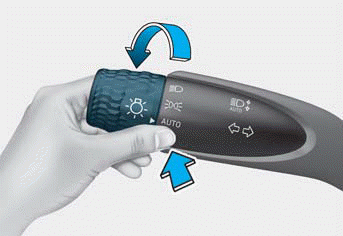
The High Beam Assist automatically switches the headlights between high beam and low beam depending on the light detected from oncoming vehicles or vehicles ahead using the front view camera.
Information
Refer to the "Driver Assistance Sensors" section in Chapter 7 for the location and general precautions of the front view camera.
High Beam Assist Settings
With the ignition ON, go to the Settings menu to select High Beam Assist to activate, or deselect to deactivate the function in the instrument cluster or infotainment system.
Select:
- User Settings > Lighting > High Beam Assist (for cluster type)
- Setting > Vehicle > Headlights > High Beam Assist (for infotainment system type)
WARNING
Change the settings only after parking your vehicle in a safe place.
High Beam Assist Operation
- After selecting High Beam Assist from the Settings menu, to operate High Beam Assist:
- Place the headlight switch in the AUTO position and push the turn signal lever away from you. The High Beam Assist indicator ( ) illuminates.
- When High Beam Assist is activated, the high beam turns on when the vehicle speed is above 25 mph (40 km/h) and the high beam indicator ( ) illuminates. When the vehicle speed is below 25 km/h, the high beam does not turn on and the indicator illuminates in white.
- When High Beam Assist is operating:
- If you pull the turn signal lever toward you when the high beam is off, the high beam turns on. When you release the turn signal lever, High Beam Assist operates again.
- If you pull the turn signal lever toward you when the high beam is on by High Beam Assist, the low beam turns on and High Beam Assist is canceled.
- If you push the turn signal lever away from you, the high beam turns on and High Beam Assist is deactivated.
- If the headlight switch is moved from AUTO to another position (headlight/position/OFF), the corresponding indicator illuminates and High Beam Assist is deactivated. - When High Beam Assist is operating, the high beam switches to low beam if:
- Headlights of an oncoming vehicle are detected.
- Taillights of a vehicle ahead are detected.
- A headlight or taillight of a motorcycle or bicycle is detected.
- The ambient light is bright enough that high beams are not required.
- Street lamps or other light sources are detected.
Information
Images and colors in the instrument cluster may differ depending on the cluster type or the theme selected from the Settings menu.
Test yourself
A quick Hyundai Tucson LM quiz: every answer comes with an explanation and a link to the manual page.