Driver Assistance System
Smart Cruise Control Display
In this manual: Driver Assistance System
~1min read
The Smart Cruise Control operation status appears in the Driving Assist mode on the instrument cluster. Refer to the "Display Modes" section in chapter 4.
During Operation
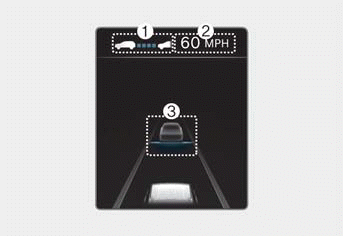
1 Whether a vehicle is ahead and the selected distance level will appear.
2 The set speed will appear.
3 Whether a vehicle is ahead and the target distance to the vehicle will appear.
When temporarily canceled
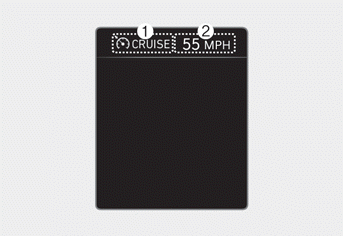
1  indicator light appears.
2 The previously set speed is shaded.
Information
- The distance to the vehicle ahead on the instrument cluster appears based on the actual distance between your vehicle and the vehicle ahead.
- The target distance may differ depending on vehicle speed and the set distance level. If the vehicle speed is low, the change in target distance may be small even though the distance to the vehicle has changed.
- Images and colors on the instrument cluster may differ depending on the cluster type or the theme selected in the Settings menu.
Test yourself
A quick Hyundai Tucson LM quiz: every answer comes with an explanation and a link to the manual page.
Was this page helpful?