Driver Assistance System
To activate Smart Cruise Control
In this manual: Driver Assistance System
~1min read
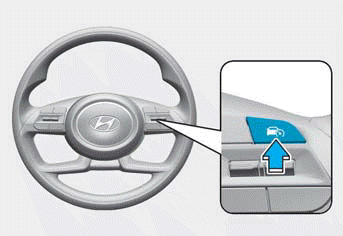
- Press the Driving Assist button (
 ) button. The set speed is set to the current vehicle speed shown on the instrument cluster.
- If there is no vehicle ahead, the set speed is maintained.
- If there is a vehicle ahead, your vehicle speed may be adjusted to maintain the distance from the vehicle ahead.
- If the vehicle ahead accelerates and the distance between vehicles increases, your vehicle accelerates to the set speed and then travels at a constant speed once your vehicle reaches the set distance.
Information
- If your vehicle speed is 0–20 mph (0–30 km/h) when the Driving Assist button is pressed, Smart Cruise Control set speed is set to 20 mph (30 km/h).
- The Driving Assist button symbol may differ depending on your vehicle's option.
- If you downshift from a higher gear using the manual shift mode or paddle shifter, the vehicle speed may not accelerate to the set speed.
Test yourself
A quick Hyundai Tucson LM quiz: every answer comes with an explanation and a link to the manual page.
Was this page helpful?