PARKVIEW REAR CAMERA
The ParkView rear back-up camera allows you to see an image of the area behind your vehicle on the screen whenever the shift selector is placed in the REVERSE position. The image will be displayed on the touchscreen along with the caution "Check Entire Surroundings" across the top of the screen. After five seconds, this message will disappear. The ParkView camera is located at the rear of the vehicle, centered above the spare tire.
Manual Activation of the Backup Camera
- Press the "Controls" button located at the bottom of the Uconnect display.
- Press the "Rear Camera" button to turn the rear camera system on.
When the vehicle shifts out of REVERSE (with camera delay disabled), the rear camera image exits and the previous screen reappears.
When the vehicle shifts out of REVERSE (with camera delay enabled), the rear camera image will be displayed for up to 10 seconds if vehicle speed does not exceed 8 mph (13 km/h), the transmission is shifted into PARK, the ignition is in the OFF position, or the touchscreen "X" button is pressed to turn off the rear camera image display.
Whenever the rear camera image is activated through the "Rear Camera" button in the "Controls" menu and vehicle speed is greater than or equal to 8 mph (13 km/h), the image display timer is started. The image will be displayed until the display timer exceeds 10 seconds.
NOTE:
- If vehicle speed remains below 8 mph (13 km/h), the rear camera image will be displayed continuously until it is deactivated using the touchscreen "X" button, the transmission is shifted into PARK, or the ignition is switched to the OFF position.
- The touchscreen "X" button to turn off the camera image display is available ONLY when the vehicle is not in REVERSE.
When enabled, active guidelines are overlaid on the image to illustrate the width of the vehicle and its predicted backing path based on steering wheel position. The dashed center line overlay indicates the center of the vehicle to assist with parking or alignment with a trailer hitch/receiver.
When turned on, the fixed guidelines are superimposed on the image showing the width of the vehicle.
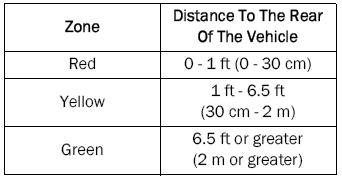
The zones of different colors indicate the distance to the rear of the vehicle.
The following table shows the approximate distances for each zone:
- To avoid damage to the vehicle, ParkView should only be used as a parking aid. The ParkView camera cannot see every obstacle or object in your path.
- To avoid damage to the vehicle, the vehicle must move slowly when using ParkView so that you are able to stop in time if an obstacle appears within view. It is recommended that the driver frequently look over the shoulder when using ParkView.
NOTE:
If snow, ice, mud, or any foreign substance builds up on the camera lens, clean the lens, rinse it with water, and wipe it dry with a soft cloth. Do not cover the lens.
Test yourself
A quick Jeep Wrangler quiz: every answer comes with an explanation and a link to the manual page.