System Setting and Activation
System Settings
- The driver can activate the systems by placing the ENGINE START/STOP button in the ON position and selecting "Settings > Vehicle > Driver Assistance > Parking Safety > Rear Cross-Traffic Safety." Turn on RCCA and RCCW and be ready to activate when "Rear Cross-Traffic Safety" is selected.
- When the engine is turned off and then on again, the systems always become ready for activation.
- When the system is initially turned on and the engine is turned off, the warning indicator on the outside rearview mirror will illuminate for 3 seconds when the engine is started again.
Warning Timing
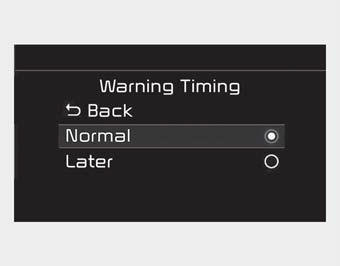
The driver can select the initial warning activation timing. Select "Settings > Vehicle > Driver Assistance > Warning Timing." The initial Rear Cross-Traffic Collision Warning includes the following:
- Normal:
When this option is selected, the initial Rear Cross-Traffic Collision Warning activates normally. If this setting seems too sensitive, change the option to "Later."
The warning activation timing may feel late if the side/rear vehicle accelerates rapidly.
- Late:
Select the warning activation timing for this warning when traffic is light and you are driving at low speed.
✽ NOTICE
If you change the warning timing, the warning timing of other systems may also change. Always be aware of this before changing the warning timing.
Warning Volume
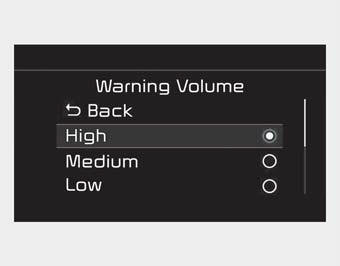
The driver can select the Rear Cross-Traffic Collision Warning volume by selecting "Settings > Vehicle > Driver Assistance > Warning Volume > High/Medium/Low."
✽ NOTICE
If you change the warning volume, the warning volume of other systems may also change. Always be aware of this before changing the warning volume.
Operating Conditions
To operate:
Go to "Settings > Vehicle > Driver Assistance > Parking Safety > Rear Cross-Traffic Safety" on the infotainment system screen.
The system will turn on and enter standby mode for activation.
The system activates when the vehicle speed is below 10 km/h and the shift lever is in the R (Reverse) position.
* The system does not activate when the vehicle speed exceeds 7 mph (10 km/h). The system activates again when the speed is below 8 km/h.
The detection range of the system is approximately 1 ft ~ 65 ft (0.5 m ~ 20 m). An approaching vehicle will be detected if its speed is within 5 ~ 8 km/h.
Note that the detection range may vary under certain conditions. As always, drive carefully and pay close attention to your surroundings when backing up your vehicle.
Test yourself
A quick Kia Cadenza VG Owner's Manual quiz: every answer comes with an explanation and a link to the manual page.