System Settings and Operation
System Settings
- Using the ENGINE START/STOP button in the ON or START position, Navigation-based Smart Cruise Control can be activated by selecting "Driver Assistance → Highway Driving Assist → Automatic Slowdown on Curves" from the "Vehicle" mode on the infotainment system. For details, refer to the separately supplied infotainment system manual.
- If the engine is turned off and then turned back on, the system retains the last setting.
Operating Conditions
Select "Highway Curve Automatic Slowdown" from the "Settings" menu on the infotainment system screen and make sure the following conditions are met for the system to operate.
- Driving on a Major Highway
- Smart Cruise Control operates when all of the listed conditions are met. The system is ON and the "AUTO" indicator on the cluster will illuminate in white.
System Operation

System Standby Mode
If the system is ON, the "AUTO" indicator will illuminate in white on the instrument cluster.
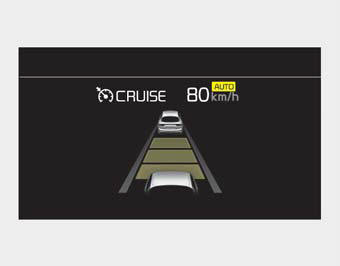
System Operation
If the vehicle is decelerating in a curve, the "AUTO" indicator on the cluster will illuminate in green.
- This system only operates for curved sections located on the main highway line.
- Depending on the curve ahead on the road, the vehicle will decelerate, and after passing the curve, the vehicle will accelerate back to the Smart Cruise Control set speed.
- The higher the driving speed, the more strongly the vehicle brakes.
- The system responds to curves located on the destination set in navigation. If no destination is set, the system will respond to road information along the expected route.
✽ NOTICE
- Navigation-based Smart Cruise Control is limited in other countries.
- The system may not operate due to the presence of leading vehicles and road conditions.
- The system operates regardless of whether a sharp curve warning appears on the navigation, but there may be a time lag between the warning and system operation.
- Navigation provides curve information only within the allowable speed range, so the system may not be able to reduce speed during extreme driving with excessive speeding.
- The system is not designed to operate on expressways other than those specified as controlled access roads.
- The system automatically cancels when you exit the highway.
- Highway Driving Assist and Navigation-based Smart Cruise Control use the same "AUTO" indicator to show system status. Therefore, even if Navigation-based Cruise Control is off, the "AUTO" indicator may be displayed.
- If there is a problem with Navigation-based Smart Cruise Control, the system cannot be activated on the AVN system screen, and the "AUTO" indicator will turn off. However, if Highway Driving Assist is activated, the "AUTO" indicator will be displayed.
- After passing through a toll gate on the highway, the system operates based on the first lane. If you enter one of the other lanes, the system may not brake correctly.
- If you exceed the speed limit, the system may not reduce vehicle speed in a curve.
- System deceleration may be insufficient if the driver accelerates while the system is operating.
- System deceleration may be insufficient due to road conditions such as uneven road surfaces, narrow roads, etc.
- If the road is under construction or there are holiday events, the system may not operate correctly.
✽ NOTICE
Navigation-based Cruise Control may not operate properly in the following situations:
- The navigation does not operate properly.
- The navigation does not update.
- Real-time GPS or map information is inaccurate.
- The navigation is overloaded with functions such as route search, video playback, voice recognition, etc. running simultaneously.
- GPS signals are blocked in areas such as tunnels.
- The driver deviates from the route, or the destination route is changed or cancelled by resetting the navigation.
- The vehicle enters a service area or rest area.
- The highway shape section has changed.
- Android Auto or CarPlay is running.
- The navigation cannot detect the current position of the vehicle (for example, elevated roads including overpasses next to public roads, or nearby roads running parallel).
- The navigation updates while driving.
- The navigation resets while driving.
- The road is slippery due to bad weather conditions such as rain or snow.
This device complies with Part 15 of the FCC Rules.
Operation depends on the following three conditions:
1. This device may not cause harmful interference, and
2. This device must accept any interference received, including interference that may cause undesired operation.
3. Changes or modifications not expressly approved by the party responsible for compliance could void the user's authority to operate the equipment.
Radio Frequency Radiation Exposure Information:
This equipment complies with FCC radiation exposure limits set forth for an uncontrolled environment.
This equipment must be installed and operated with a minimum distance of 8 inches (20 cm) between the radiator (antenna) and your body.
This transmitter must not be co-located or operating in conjunction with any other antenna or transmitter.
Test yourself
A quick Kia Cadenza VG Owner's Manual quiz: every answer comes with an explanation and a link to the manual page.