Turn Signal and Lane Change Signal
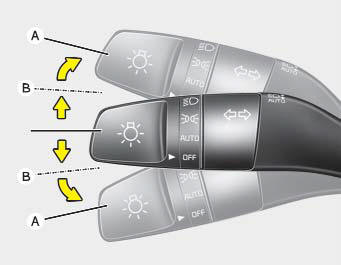
The ENGINE START/STOP button must be in the ON position for the turn signals to operate. To signal a turn, move the lever up or down (A). The green arrow indicators on the instrument panel show which turn signal is operating.
They cancel automatically after the turn is completed. If the indicator continues to flash after the turn, manually return the lever to the OFF position.
To signal a lane change, move the turn signal lever slightly and hold it in position (B). The lever will return to the OFF position when released.
If the indicator continues to illuminate without flashing, or if it flashes abnormally, one of the turn signal bulbs may have burned out and will need to be replaced.
One-Touch Turn Signal Lamp
When you change lanes, even if the turn signal lever returns to its original position after the turn, slightly move the signal lever to position B, and the turn signal lamp will flash 3 times (or 5 or 7 times).
This is a function that helps you continue operating the turn signal even if you do not hold the lever when changing lanes. You can change the number of flashes (3, 5 or 7 times) or turn off the One-Touch Turn Signal Lamp function in the Infotainment System under Settings → Vehicle → Lamps → One-Touch Turn Signal.
✽ NOTICE
If the indicator flashes abnormally fast or slow, a bulb may be burnt out or there may be a poor electrical connection in the circuit.
Test yourself
A quick Kia Cadenza VG Owner's Manual quiz: every answer comes with an explanation and a link to the manual page.