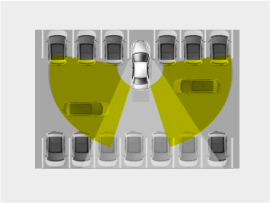
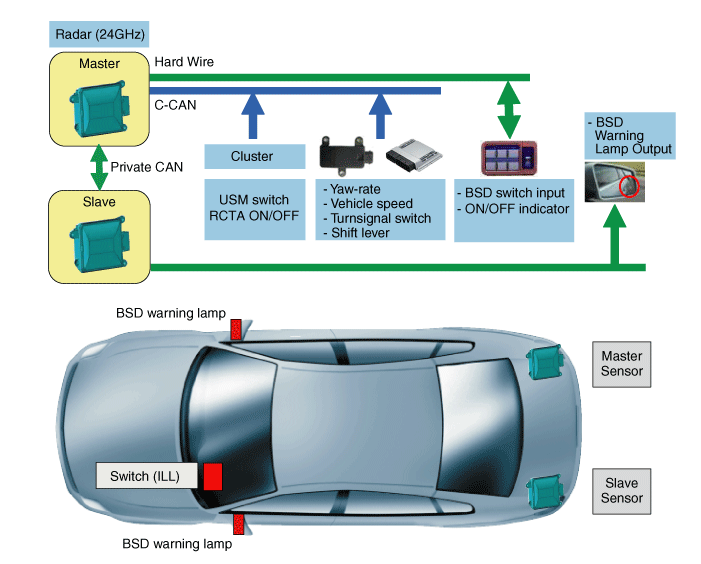
The BSD (Blind Spot Detection) system uses a radar sensor to warn the driver while driving. It detects the rear of the vehicle and provides information to the driver.
BSD (Blind Spot Detection) warning range depends on your vehicle speed. However, if your vehicle speed is approximately 10 km/h higher than that of the other vehicle, the warning does not operate.
LCA (Lane Change Assist): When a vehicle approaches your vehicle at high speed, the warning is activated.
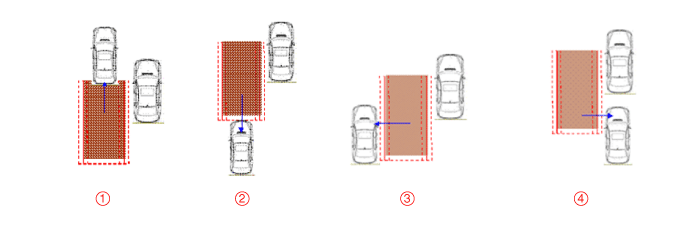
RCTA (Rear Cross Traffic Alert): When your vehicle is reversing, the sensor detects approaching vehicles and the warning is activated.
System Operating Mode
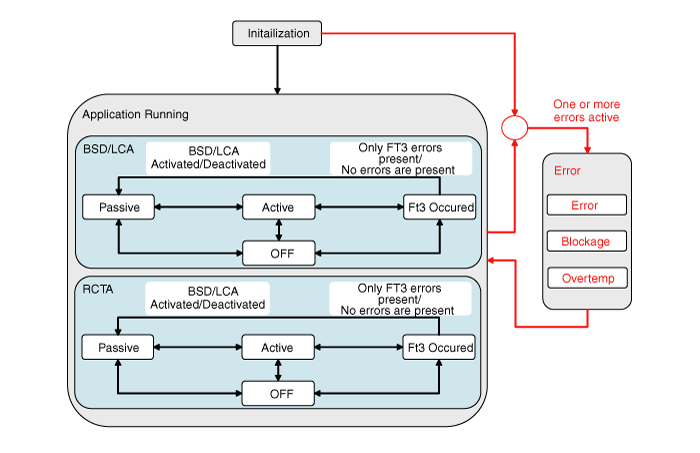
When the engine is started with the switch off, the OFF mode is activated. ? Systems can be controlled separately based on each activation condition. For example, the BSD and LCA system is turned on by the BSD button switch and the RCTA system is turned on by the RCTA USM switch.
When the ON switch is pressed in OFF mode, the passive mode is activated.
If the engine is started with the switch off, the passive mode is activated. ? When the ignition is on, the switch is in its initial state: the last position is retained.
If IGN OFF -> ON with the switch on, the switch is ON.
If IGN OFF -> ON with the switch off, the switch is OFF.
If you start the engine with the BSD switch on, or if you turn on BSD and LCA with BSD off, the outside rearview mirror indicator lights up for 3 seconds.
If the activation conditions (speed and radius of curvature) are met during driving, the active mode is activated (warning is issued).
If the activation conditions (vehicle speed or curve radius) are not met while driving, the passive mode is activated (warning disabled).
Depending on the detected malfunctions, the BSD and LCA system (including the RCTA system) enters Fail mode.
If the detected malfunction is cleared, the BSD and LCA system (including the RCTA system) returns to the last mode before Fail mode.
If the OFF button is pressed while the system is operating, the system enters OFF mode. ? Since the systems are controlled separately, only the BSD and LCA system enters OFF mode when the BSD switch is set to OFF. Only the RCTA system enters OFF mode when RCTA USM OFF is selected.
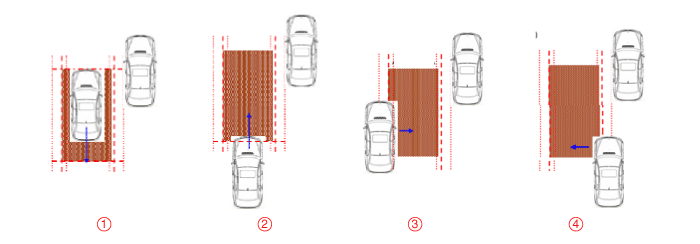
Warning Zone
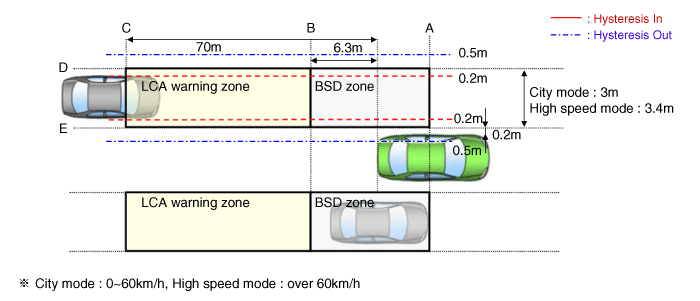
BSD Warning Activation ConditionsThe entire body of the target vehicle is behind line A.Any part of the target vehicle crosses line B.Any part of the target vehicle crosses line D and hysteresis In.The entire part of the target vehicle passes line E and hysteresis In.
BSD Warning Deactivation ConditionsThe entire body of the target vehicle moves ahead of line A.The entire body of the target vehicle moves behind line B.The entire body of the target vehicle passes line D and hysteresis Out.The entire part of the target vehicle passes line E and hysteresis Out.
LCA Warning Activation ConditionsThe entire body of the target vehicle is behind line B.Any part of the target vehicle crosses line C.Any part of the target vehicle crosses line D and hysteresis In.The entire part of the target vehicle passes line E and hysteresis In.Under all of the above conditions, TTC (time to collision) is 4.5 s or more.
LCA Warning Deactivation ConditionsThe entire body of the target vehicle is in front of line B.The entire body of the target vehicle crosses line C.The entire body of the target vehicle passes line D and hysteresis Out.The entire body of the target vehicle passes line E and hysteresis Out.Under all of the above conditions, TTC (time to collision) does not exceed 4.5 s.
Sensor Activation ConditionsBSD and LCA switch (indicated by the switch LED) is ON.Vehicle speed: 30 km/h or fasterRadius of curvature: 100 m or moreRelative vehicle speed: All except -10 ~ 250 km/h ("-" means the vehicle ahead is being overtaken)
Sensor Deactivation ConditionsBSD and LCA switch (indicated by the switch LED) is OFF.Vehicle speed: 28 km/h or lowerCurve radius: 70 m or lessRelative vehicle speed: All except -10 ~ 250 km/h ("-" means the vehicle ahead is being overtaken)
System Control ProhibitionRadar covered with debris: System status - Blockage message is displayed
If the sensor on the rear bumper is covered with snow, dirt, or stickers, its detection performance may be reduced.
Radar installation damaged by external impact: Record the DTCBSD and LCA system malfunction: Output the DTC.Radar overheated: System status - Overheat warning is displayed.
Rear Cross Traffic Alert (RCTA)
Item
Reference value
Notes
Vehicle operating speed
0 - - 10 km/h
Operation in reverse gear
Relative speed
4 - 36 km/h
+: closing
Operating distance
0.5 - 20 m
Vehicles: 20 m Motorcycles: 15 m Shopping carts: 10 m
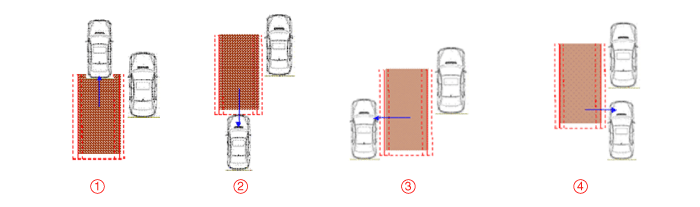
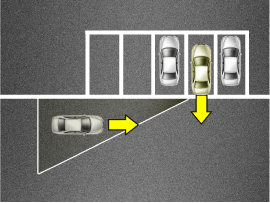
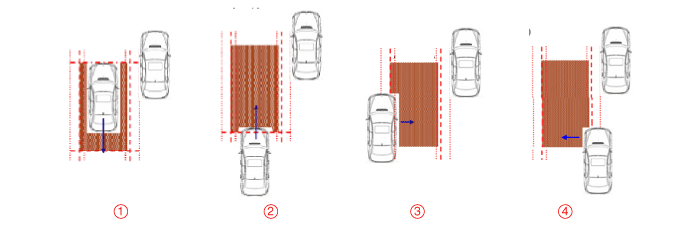
This function assists the driver in detecting an approaching vehicle from behind that cannot be visually confirmed when the driver reverses to back the vehicle out of a parking space.A warning is generated for the target vehicle if it is within two seconds based on TTC (Time To Collision). Pedestrians are not considered as approaching targets when the driver is warned. (A warning may not be generated.)
Time To Collision (TTC): The expected time until the target affects the driver's vehicle, based on the relative distance and speed of the approaching vehicle. If it is less than 2.0 seconds, a warning is generated.The warning zone is shown in the following figure: Detection range
Rear Cross Traffic Alert (RCTA): When your vehicle is reversing out of a parking space, the sensor detects approaching vehicles and informs the driver.Operating Conditions
When the ignition is ON, press the BSD switch. The switch indicator illuminates and the system is ready for operation.
The system operates when vehicle speed is below 10 km/h with the R gear engaged.
The RCTA detection range is 0.5 m ~ 20 m depending on the side direction. If the approaching vehicle speed is 4 ~ 36 km/h when within the detection range, it is detected. However, the sensitivity range of the system depends on conditions. Always pay attention to your surroundings.
Warning Type
If a vehicle detected by the sensors approaches your vehicle, a warning chime sounds and the indicator on the outside rearview mirror flashes.
If the detected vehicle leaves the detection zone behind your vehicle, moving in the opposite direction or moving slowly, the warning is canceled.
The system may malfunction due to the following conditions. Always pay attention to your surroundings.
Malfunction
Curved roads, toll gates, etc.
The sensor area is contaminated with rain, snow, mud, etc.
The rear bumper near the sensor is covered or obstructed by foreign objects, such as a sticker, bumper guard, bicycle rack, etc.
The rear bumper is damaged or the sensor is out of position.
The vehicle height changes significantly, such as when the trunk is loaded with heavy items, abnormal tire pressure, etc.
Due to bad weather, such as heavy rain or snow.
A stationary object is nearby, such as a guardrail, etc.
A large amount of metallic material is nearby, such as at a construction site.
A large vehicle, such as a bus or truck, is nearby.
A motorcycle or bicycle is nearby.
A flat trailer or similar vehicle is nearby.
When another vehicle passes very quickly.
When changing lanes.
When driving down or up a steep road with different lane heights.
When another vehicle follows very closely behind or passes very closely.
When a trailer or carrier is installed.
When the rear bumper temperature is high.
When the sensors are blocked by a vehicle, wall, or parking pillar.
When your vehicle is reversing and the detected vehicle is also reversing.
When there are small objects such as a shopping cart or baby stroller.
When there is a low-height vehicle, such as a point vehicle.
When a vehicle approaches your vehicle.
Examples of improper service: • Check the bumper condition. - If the bumper skin is covered with snow or dirt, warning system performance may degrade. • Check the surrounding bumper. - If metallic objects are near the radar sensor, false warnings may occur. • Check the bumper shape and installation condition. - If the bumper and radar sensor are installed incorrectly, warning system performance may degrade. • Check the installation condition of the bumper, bracket, and radar sensor for displacement. - Bumper: installation condition, cracks in the bumper - Bracket: modification, disconnection, bracket positioning - Sensor mounting: loose screw, check for foreign objects. • Check the switch LED. - Not output in DTC, as checking for open and short circuits is not possible.
Warning Status
?
Test yourself
A quick Kia Optima Hybrid Owner's Manual quiz: every answer comes with an explanation and a link to the manual page.
 The entire body of the target vehicle is behind line A.
 Any part of the target vehicle crosses line B.
 Any part of the target vehicle crosses line D and hysteresis In.
 The entire part of the target vehicle passes line E and hysteresis In.
 Under all of the above conditions, TTC (time to collision) is 4.5 s or more.