Vehicle Specifications
Using the Cargo Security Screen
In this manual: Vehicle Specifications
~1min read
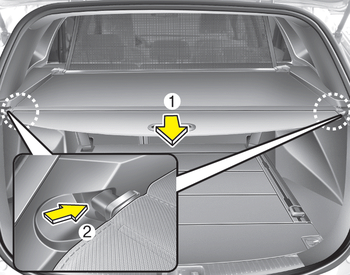
1. Pull the cargo security screen toward the rear of the vehicle by the handle (1).
2. Insert the guide pin into the guide (2).
✽ NOTICE
Pull the cargo security screen by the handle in the center to prevent the guide pin from coming out of the guide.
When the cargo security screen is not in use:
1. Pull the cargo cover back and down to release it from the guides.
2. The cargo security screen will automatically slide back.
✽ NOTICE
The cargo security screen cannot slide back automatically if it is not fully extended. Pull it out fully, then release it.
Test yourself
A quick Kia Cee'd quiz: every answer comes with an explanation and a link to the manual page.
Was this page helpful?