LKA System Operation
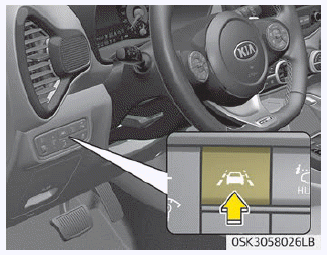
To activate/deactivate LKA:
When the Engine Start/Stop button is in the ON position, LKA turns on automatically. The indicator ( ) on the cluster display will first illuminate white. If you press the LKA button located on the instrument panel at the lower left of the driver's side, LKA will turn off and the indicator on the cluster display will go off.
The indicator color changes depending on the LKA status.
- White: The sensor does not detect lane markings or vehicle speed is below 60 km/h.
- Green: The sensor detects lane markings or road edge, and the system can control steering.
Activating the LKA System
- To view the LKA system screen on the LCD in the cluster, press the Tab on the Assist mode ( ).
- For more information, refer to [Menu Settings] in chapter 4, [Automatic Panel].
- After the LKA system is activated, if lane markings or road edge are detected, vehicle speed exceeds 60 km/h, and all activation conditions are met, the green indicator on the steering wheel will illuminate and the steering wheel will be controllable.
WARNING
The Lane Keeping Assist System is a system that helps prevent the driver from unintentionally leaving the lane or road edge. However, the driver should not rely solely on the system and should always check road conditions while driving.
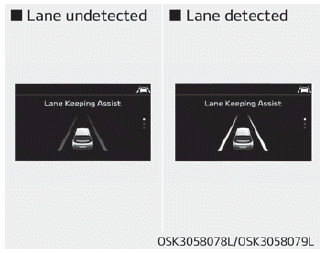
If the vehicle speed exceeds 60 km/h and the system detects the lane markings, the color changes from gray to white.
Test yourself
A quick Kia Soul Owner's Manual quiz: every answer comes with an explanation and a link to the manual page.