Smart Cruise Control (SCC) System
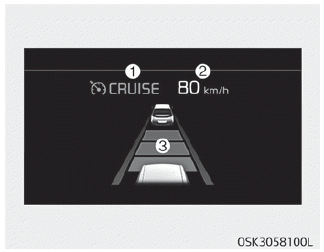
1. Cruise Indicator
2. Set the speed
3. Distance between vehicles
To view the SCC screen on the cluster LCD, select the driver assistance mode ( ). For more details, refer to "LCD Display" on page 4-51.
The Smart Cruise Control system allows you to program the vehicle to maintain a constant speed and distance from the vehicle ahead without pressing the accelerator pedal or the brake pedal.
WARNING
For safety, read the owner's manual before using the Smart Cruise Control system.
NOTICE
To activate the Smart Cruise Control system, depress the brake pedal at least once after turning the engine start/stop button to the ON position or starting the vehicle. This is to check whether the brake switch, which is an important part of cancelling the Smart Cruise Control system, is in normal condition.
WARNING
- If the Smart Cruise Control system remains on (CRUISE indicator illuminated on the instrument panel), the Smart Cruise Control system may be accidentally activated. Keep the Smart Cruise Control system off (CRUISE indicator off) when Smart Cruise Control is not in use.
- Use the Smart Cruise Control system only when driving on open highways in good weather.
- Do not use the Smart Cruise Control system when it may be unsafe to maintain a constant speed. For example:
- Interchanges and toll gates
- Roads surrounded by an abnormally large amount of steel structures (subway construction, steel tunnel, etc.)
- Parking lots
- Lanes adjacent to guardrails on the road
- Slippery roads due to rain, ice, or snow
- Steep curved roads
- Steep hills
- Windy roads
- Off-road driving
- Roads under construction
- Rumble strips
- Detection capability is reduced if the front and rear vehicle levels change from the factory setting.
- When driving in heavy traffic or when road conditions make it difficult to maintain a constant speed
- When driving on wet, icy, or snowy roads
- When driving with limited visibility (possibly due to bad weather such as fog, snow, rain, or sandstorms) - Pay special attention to driving conditions when using the Smart Cruise Control system.
- The Smart Cruise Control system does not replace safe driving. The driver is always responsible for monitoring the speed and the distance to the vehicle ahead.
- Be careful when driving downhill with SCC.
- Limited visibility (rain, snow, smog, etc.)
- Do not use the cruise function while towing a vehicle to prevent any damage.
- Always set the vehicle speed below the speed limit in your country.
- Unexpected situations may lead to possible accidents. Continuously pay attention to road conditions and driving, even when the Smart Cruise Control system is in operation.
Test yourself
A quick Kia Soul Owner's Manual quiz: every answer comes with an explanation and a link to the manual page.