Smart Cruise Control Speed
To set the Smart Cruise Control speed:
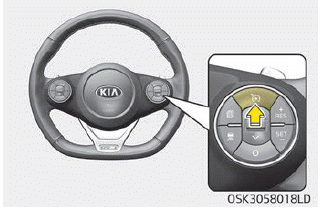
1. Press the CRUISE button to turn on the system. The CRUISE indicator on the instrument cluster will illuminate.
2. Accelerate to the desired speed. The Smart Cruise Control speed can be set as follows:
• 10 km/h ~ 160 km/h
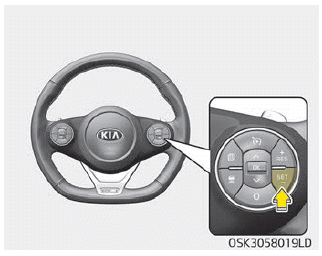
3. Press the (SET-) button and release it at the desired speed. The set speed and the distance between vehicles will appear on the LCD display.
4. Release the accelerator pedal. The desired speed will be maintained automatically.
If a vehicle is ahead of you, the speed may decrease to maintain the distance to the vehicle ahead.
On a steep hill, the vehicle may slightly decelerate or accelerate uphill or downhill.
Your vehicle speed may decrease on an uphill grade and increase on a downhill grade.
The speed is set to 30 km/h when the vehicle speed is between 10 and 30 km/h.
NOTICE
The vehicle speed may decrease uphill and increase downhill.
To Increase the Smart Cruise Control Set Speed
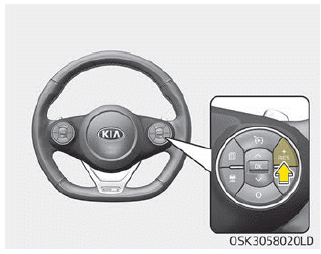
Perform any of the following procedures:
- Press and hold the (RES+) button. The set speed of your vehicle will increase by 10 km/h. Release the lever at the desired speed.
- Press and immediately release the (RES+) button. The cruise set speed will increase by 1 km/h each time the lever is moved up (to the RES+ position) in this manner.
- You can set the speed up to 160 km/h.
CAUTION
Check traffic conditions before using the switch. Vehicle speed increases rapidly when the (RES+) button is pressed and held.
To decrease the Smart Cruise Control set speed:
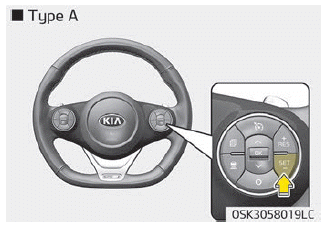
Perform any of the following procedures:
- Press and hold the (SET-) button. The set speed of your vehicle will decrease by 10 km/h. Release the button at the desired speed.
- Press and immediately release the (SET-) button. The cruise set speed will decrease by 1 km/h each time the (SET-) button is pressed in this manner.
- You can set the speed up to 30 km/h.
To temporarily accelerate with cruise control on:
If you want to temporarily increase speed with cruise control on, press the accelerator pedal. The increased speed will not interfere with cruise control operation or change the set speed.
To return to the set speed, release the accelerator pedal.
If you press the (SET-) button at a higher speed, the set cruise speed will be set again.
NOTICE
Use caution when temporarily accelerating, because speed is not controlled automatically at this time, even if a vehicle is ahead of you.
Smart Cruise Control will be temporarily canceled if:
Canceled Manually
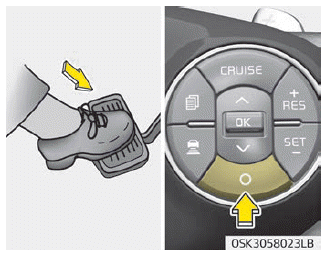
Smart Cruise Control is temporarily canceled when the brake pedal is pressed or the CANCEL button is pressed. Depress the brake pedal and press the CANCEL button while the vehicle is stopped. The set speed and the vehicle ahead distance indicator on the instrument cluster disappear, and the CRUISE indicator stays on.
Canceled Automatically
- The driver door is opened.
- The shift lever is in the N (Neutral), R (Reverse), or P (Park) position.
- The EPB (Electronic Parking Brake) is applied.
- The vehicle speed is above 170 km/h.
- ESC, ABS, or TCS is operating.
- ESC is turned off.
- The sensor or cover is contaminated or blocked by foreign matter.
- The accelerator pedal has been pressed continuously for a long time.
- The speed is in the danger zone.
- SCC system malfunction.
- When the ISG mode is activated.
- When the Forward Collision-Avoidance Assist (FCA) system uses braking control to help avoid a frontal collision, the system
- The vehicle has been stopped for more than 5 minutes.
- The vehicle stops and starts repeatedly over a long period of time.
- The driver starts moving by pressing the (RES+) or (SET-) button or by pressing the accelerator pedal after the vehicle has been stopped by the Smart Cruise Control system when there are no other vehicles ahead.
- When the parking brake is applied.
- The vehicle has a problem.
Each of these actions cancels the Smart Cruise Control operation (the set speed and vehicle ahead distance on the LCD will disappear). When the Smart Cruise Control is automatically canceled, it does not resume operation even if the RES+ or SET- button is pressed.
CAUTION
If Smart Cruise Control is canceled for reasons other than those listed above, have the system inspected by a professional workshop. Kia recommends visiting an authorized Kia Dealer/Service Partner.
CAUTION
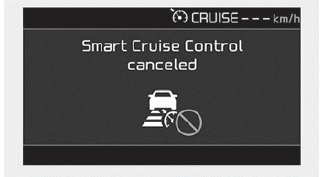
If the system is automatically canceled, a warning chime sounds and a message appears for several seconds.
You must control the vehicle speed by pressing the accelerator or brake pedal depending on the road conditions ahead and driving conditions.
Always check the road conditions. Do not rely on the warning chime.
To resume the set cruise speed:
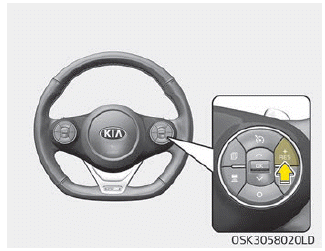
If any method other than the CRUISE button was used to cancel the cruise speed and the system is still active, the cruise speed will automatically resume when you press the (RES+) button.
If you press the (RES+) button, the speed returns to the last set speed. However, if the vehicle speed drops below 10 km/h, it will not resume.
NOTICE
To reduce the risk of an accident, always check the road conditions when reactivating Smart Cruise Control with the RES+ lever to make sure that road conditions allow safe use of cruise control.
To turn off cruise control:
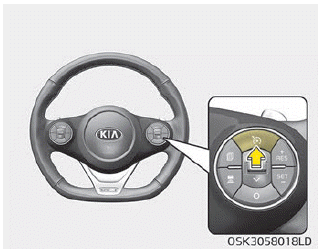
Press the CRUISE button. (The CRUISE indicator on the instrument cluster will turn off.)
If you do not need the Smart Cruise Control system, press the [CRUISE] switch to deactivate the system.
Test yourself
A quick Kia Soul Owner's Manual quiz: every answer comes with an explanation and a link to the manual page.