Using the Bluetooth Audio System
Turning on Bluetooth audio mode
To listen to recordings from a portable Bluetooth audio device and operate it using the vehicle's audio system control panel, turn on Bluetooth audio mode. Each portable Bluetooth audio device must be paired with the vehicle's Bluetooth system before it can be used.
See "Preparing a Bluetooth Portable Device (Type C/Type D)" on page 5-113.
1. Turn on the portable Bluetooth audio device.
2. Set the ignition switch to ACC or ON.
3. Select the icon on the
home screen and display the Entertainment function screen.
4. When Bluetooth is selected, Bluetooth audio mode is activated and track playback can be started.
CAUTION
If you use a Bluetooth audio device after using the Aha or Stitcher radio, first close the application on the mobile device.
If playback from the portable Bluetooth audio device does not start, select the icon
 .
If the audio system mode is changed from Bluetooth audio to another mode (radio mode), playback from the portable Bluetooth audio device will stop.
Playback
Set the operating mode to Bluetooth audio to play music from a portable Bluetooth audio device through the speakers in your vehicle. (See "Activating Bluetooth Audio Mode") When Bluetooth audio mode is selected, the following icons appear at the bottom of the display. The available icons vary depending on the version of the Bluetooth audio device being used.
| Icon | Function |
 | Displays the Entertainment function menu. Use this button to switch between the different audio sources. |
 | (AVRCP version 1.4 only) Displays the top-level folder/file list in the hierarchy. |
Select the folder you want to open.
Files in the selected folder are displayed.
Select the file you want to play

If selected again, the tracks in the folder are repeated.
Select again to cancel.
The icon changes when the track is repeated and when the folder is repeated.

When selected again, the tracks on the device are played in random order.
Select again to cancel.
The icon changes when the track is repeated in random order and when the folder is played.

When this icon is selected again, the beginning of each track stored on the device is played.
If selected again, the function is cancelled and you can continue listening to the current track.

Press and hold to start fast reverse. Playback stops when you release the icon or the control knob.


Touch and hold to start fast forward. Playback stops when you release the icon or the control knob.

Example of use (when searching for a track from the top level of the device list)
1. Select the icon and display
the list of folders/files at the top level of the hierarchy.
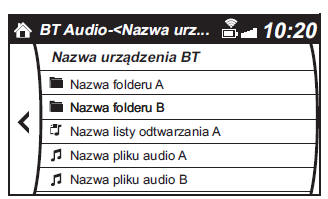
2. After selecting a folder, the lists of folders/files in that folder are displayed.
When a playlist is selected, the file list is displayed.
3. Select the desired track.
CAUTION
To go up one folder level, select .
Test yourself
A quick Mazda 2 quiz: every answer comes with an explanation and a link to the manual page.