HomeLink® Universal Transceiver
NOTE
HomeLink and the HomeLink logo are registered trademarks of Johnson Controls.
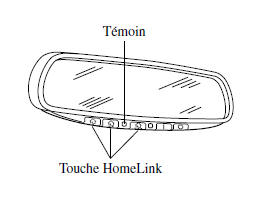
The HomeLink system replaces up to 3 hand-held transmitters with a single built-in unit in the auto-dimming rearview mirror. Garage doors, gates and other devices can be operated by pressing the HomeLink buttons on the auto-dimming rearview mirror.
WARNING
Do not use HomeLink with a garage door opener that does not have an automatic reverse and stop feature:
Using HomeLink with a garage door opener that does not have an automatic reverse and stop feature as required by federal safety standards is dangerous.
(This includes garage door openers manufactured before April 1, 1982.) Using such garage door openers may increase the risk of serious injury or death. For more information, contact HomeLink toll-free at 1-800-355-3515, visit the website at www.Homelink.com, or see an authorized Mazda dealer.
Always make sure there is no obstruction and no one is in the area of the garage door or gate before programming or using HomeLink:
Programming or using HomeLink without making sure it is safe in the area of the garage door or gate is dangerous and may cause an accident and serious injury if someone is struck by the garage door or gate.
NOTE
Programming will not be erased even if the battery is disconnected.
Preparing HomeLink for Programming
NOTE
It is recommended that new batteries be installed in the hand-held transmitter of the device to be programmed into HomeLink. This speeds up learning and ensures accurate transmission of radio frequency signals.
- Make sure a hand-held transmitter is available for the device to be programmed.
- Disconnect the power to the device.
Programming HomeLink
WARNING
When programming a garage door opener or gate, disconnect the power to these devices before programming, as continuous operation of the device may damage the motor.
The HomeLink system has 3 buttons that can be selected and programmed individually using a commercially available hand-held transmitter, as follows:
- Hold the end of the hand-held transmitter 2.5 to 7.5 cm (1 to 3 in.) away from the HomeLink button you want to program, while continuing to watch the indicator light.
- Press and hold the selected HomeLink button and the hand-held transmitter button at the same time. Do not release the buttons until step 3 is complete.
NOTE
For some garage door or gate openers, step 2 of programming may need to be replaced by the procedures described in the "Gate Opener/Canadian Programming" section.
- When the HomeLink indicator light changes from slow to rapid flashing, release both the HomeLink and the hand-held transmitter buttons.
NOTE
If the HomeLink indicator light does not change from slow to rapid flashing, contact HomeLink on the web at www.homelink.com or toll-free at 1-800-355-3515 for technical assistance.
- Firmly press and hold the programmed HomeLink button for five seconds, then release it.
Perform this operation twice to activate the door. If the door does not activate, press and hold the newly programmed HomeLink button and watch the indicator light.
If the indicator light stays on without flashing, programming is complete and the device should now be operated using the HomeLink button.
NOTE
To program the other two HomeLink buttons, start again at "Programming" – step 1.
If the indicator light flashes rapidly for two seconds and then stays on, continue with steps 5 to 7 of programming to complete programming of a device equipped with rolling code (usually a garage door opener).
- Locate the learn button on the receiver (motor unit) of the garage door opener, inside the garage. It is usually located near the base of the antenna wire on the motor unit.
- Firmly press the learn button. (The name and color of the button vary by manufacturer.)
NOTE
Step 7 must be started within 30 seconds.
- Return to the vehicle and firmly press, hold for 2 seconds, then release the programmed HomeLink button. Repeat the press/hold/release sequence a second time and, depending on the garage door opener brand (device equipped with rolling code), repeat this sequence a third time to complete programming.
The HomeLink system should now operate the device equipped with rolling code.
NOTE
To program the other two HomeLink buttons, start again at "Programming" – step 1.
For any questions or comments, contact HomeLink on the Web at www.homelink.com or toll-free at 1-800-355-3515.
Gate Operator/Canadian Programming
Radio frequency regulations in Canada require that signals be transmitted for only a few seconds, which may not be enough for the HomeLink system to receive the signal during programming. The same applies to some gate operators in the United States.
In Canada, or if you have difficulty programming a gate operator using the programming method (in any country), replace step 2 of the programming procedure with the following steps:
NOTE
When programming a garage door opener or gate operator, it is recommended to unplug the device during the cycling procedure to prevent overheating.
Hold the HomeLink button while pressing and releasing the remote control button (cycling) every two seconds until the HomeLink system accepts the signals. (The indicator will flash slowly, then quickly.) Go to programming step 3 to complete programming.
Using the HomeLink System
Press the programmed HomeLink button to operate the corresponding device. The code continues to be transmitted for up to 20 seconds.
Reprogramming the HomeLink System
To program a device to a HomeLink button that is already programmed, follow these steps:
- Press and hold the desired HomeLink button.
DO NOT release the button.
- The indicator begins to flash after 20 seconds. Without releasing the HomeLink button, go to programming step 1.
Clearing the HomeLink Buttons
To clear the programming of all three HomeLink buttons, press and hold the two outer buttons (
) on the auto-dimming rearview mirror until the HomeLink indicator begins to flash after about 10 seconds.
Check that the programming has been cleared when the vehicle is not in use.
Test yourself
A quick Mazda 6 quiz: every answer comes with an explanation and a link to the manual page.