"High-end" navigation: Screen operation
The screen displays:
- the different menus,
- the direction to the destination,
- the distance to the destination,
- the route diagrams,
- the distance to the next change of direction,
- maps,
- etc.
The screen comes on a few seconds after the "accessories" position or when the radio is switched on, and displays the safety message.
The screen turns off completely approximately 45 seconds after the power supply is cut.
Note:The screen colour and brightness can be changed in the "screen settings" menu:
- Day colours in blue or dark blue (parking lights off).
- Night colours in blue or dark blue (parking lights on).
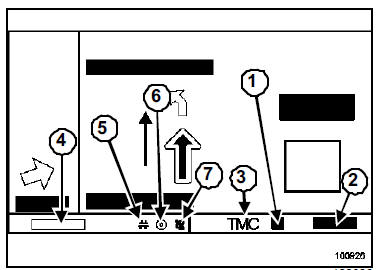
- Disturbance level
- Distance before disturbance
- "Traffic information" message icon
- Arrival time or remaining distance (configurable)
- "Guidance criteria" icon
- "Disc present" icon
- "Satellite reception quality" icon
RADIO SPECIFICS
If the vehicle is fitted with an original-equipment radio, the display will appear on the screen (radio on only) in the banner.
When changing a radio setting, the radio display then fills the whole screen (better visibility) in "list" or "preset" mode.
Note: If radio-related information does not appear on the screen, (see Telematic System chapter, "High-end" navigation: Initialisation, page 83C-34). WARNINGTo clean the screen, do not use any cleaning product (clean with a dry or slightly damp soft cloth).
Test yourself
A quick Renault Megane quiz: every answer comes with an explanation and a link to the manual page.