GPS Marker Does Not Appear
PRECAUTION / NOTICE / HINT
NOTICE:
- Depending on the parts replaced during inspection or maintenance of the vehicle, initialization, registration or calibration may be required. Refer to the precautions for the audio and visual system.
Click here

- The following events may occur if a radio receiver and display assembly from another vehicle is installed in this vehicle. Therefore, when replacing the radio receiver and display assembly, be sure to replace it with a new part.
- A communication malfunction DTC is stored.
- The radio receiver and display assembly does not operate normally.
PROCEDURE
CHECK INTERIOR
(a) Make sure that there are no objects in the cabin that could block radio reception, or devices that use radio waves, on the instrument panel. If an object is found, remove it and check whether the GPS marker appears again.
HINT:
GPS works using extremely weak radio waves generated by satellites. If the signal is blocked by obstacles or other radio waves, the GPS system may not receive it properly.
OK:
The GPS marker appears.
| OK |  |
END |
|

CHECK SURROUNDINGS
(a) Check whether the vehicle is in a location with poor GPS signal reception. If so, move the vehicle and check whether the GPS marker appears again.
HINT:
The GPS system uses 24 satellites placed in 6 orbits. At all times, 4 satellites must be able to locate the vehicle. However, GPS signals may be unable to reach the vehicle due to factors such as the environment, the vehicle's direction, or the time of day. For examples, refer to the following illustration.
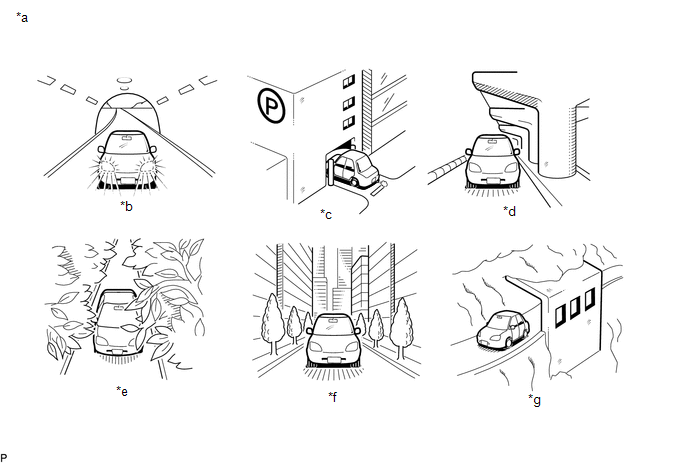
*a |
Example |
*b |
In a tunnel |
*c |
In a building |
*d |
Under an overpass |
*e |
In a forest or on a tree-lined road |
*f |
Between tall buildings |
*g |
Under a cliff or overhang |
- |
- |
OK:
The GPS marker is displayed.
| OK | |
END (SYSTEM RETURNS TO NORMAL) |
|
CHECK GPS INFORMATION (OPERATION CHECK)
(a) Go to the "System Sensors Check" screen. Refer to Check GPS & Vehicle Sensors in Operation Check.
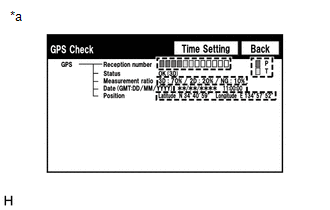
*a |
without navigation system |
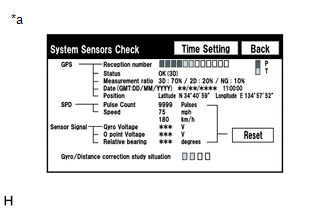
*a |
with navigation system |
Without navigation system: Click here
With navigation system: Click here
(b) Check the number of the following codes displayed in "Reception number".
HINT:
T or P is displayed.
OK:
At least 3 codes are displayed.
| OK | |
REPLACE RADIO AND DISPLAY RECEIVER ASSEMBLY |
| NG | |
GO TO APPLICABLE SYSTEM AS INDICATED IN THE PROBLEM SYMPTOMS TABLE |