Sudden changes in sound in CD playback mode
PROCEDURE
CHECK CD
(a) Make sure the CD is not deformed or scratched. OK: The CD is not deformed or scratched. |
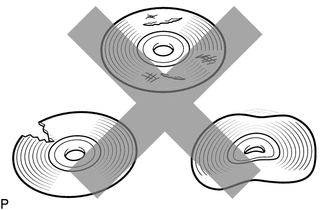 |
| NG |  |
END (CD IS DEFECTIVE) |
|

CHECK CD
(a) Check CD. OK: The CD is clean. NOTICE: Do not use record cleaning products or antistatic products. HINT: If the CD is dirty, wipe it with a soft cloth from the center outward. |
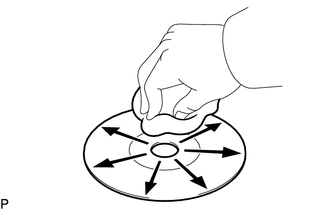 |
| NG | |
CLEAN CD |
|
REPLACE CD AND RECHECK
(a) Replace the CD with a good one and make sure the malfunction is eliminated again.
OK:
The malfunction disappears.
| OK | |
END (CD WAS DEFECTIVE) |
|
CHECK RADIO RECEIVER ASSEMBLY
(a) Check the installation condition of the radio receiver assembly.
(1) Check whether the radio receiver assembly is installed correctly.
OK:
The radio receiver assembly is correctly installed.
| OK | |
REPLACE RADIO RECEIVER ASSEMBLY |
| NG | |
CORRECTLY INSTALL THE RADIO RECEIVER ASSEMBLY |