Interior features
Bluetooth® phone settings
In this manual: Interior features
15steps
~90min
4/5difficulty
Done 0 of 15
You can adjust the hands-free system to your desired settings. “Phone/message settings” screen
Sound setting
To display the screen shown below, press the “setup” button, and select “phone” on the “setup” screen.
- Set the phone connection
- Setting the sound
- Contact/call history settings
- Set the message settings
- Set the phone display

Sound setting
- Display the “phone/message settings” screen.
- Select “sound settings” on the “phone/message settings” screen.
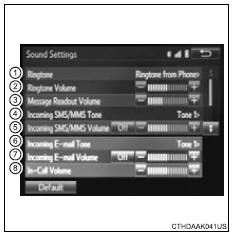
- Set the desired ringtone.
- Adjust the ringtone volume.
- Adjust the message readout volume.
- Set the desired incoming sms/mms tone.
- Adjust the incoming sms/ mms tone volume.
- Set the incoming e-mail tone.
- Adjust the incoming e-mail tone volume.
- Adjust the default volume of the other party’s voice.
Select “default”, and then “yes”.
Test yourself
A quick Toyota RAV4 quiz: every answer comes with an explanation and a link to the manual page.
Was this page helpful?