Interior features
Radio operation
In this manual: Interior features
9steps
~54min
2/5difficulty
Done 0 of 9
Select “am” or “fm” on the audio source selection screen to begin listening to the radio. Audio control screen
Selecting a station
Pressing the “audio” button displays the audio control screen from any screens of the selected source.
- Audio source selection screen appears
- Preset stations
- Scanning for receivable station
- Select to display a list of receivable stations
- Setting the sound
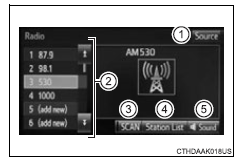
Selecting a station
Tune in to the desired station using one of the following methods.
Seek tuningPress the “seek >” button or “< track” button.
The radio will begin seeking up or down for a station of the nearest frequency and will stop when a station is found.
Manual tuningTurn the “tune•scroll” knob.
Preset stationsSelect the desired preset station.
Setting station presets- Search for desired stations by turning the “tune•scroll” knob or pressing the “seek >” button or “< track” button.
- Select “(add new)”.
To change the preset station to a different one, select and hold the preset station.
- Select “yes”.
- Select “ok” after setting the new preset station.
- Select “refresh” on the “station list” screen.
To cancel the refresh, select “cancel refresh”.
Reception sensitivity- Maintaining perfect radio reception at all times is difficult due to the continually changing position of the antenna, differences in signal strength and surrounding objects, such as trains, transmitters, etc.
- The radio antenna is mounted on the roof. The antenna can be removed from the base by turning it.
Test yourself
A quick Toyota RAV4 quiz: every answer comes with an explanation and a link to the manual page.
Was this page helpful?