Registering a bluetooth® device
- Display the “bluetooth* setup” screen.
*: Bluetooth is a registered trademark of bluetooth sig, inc.
- Select “add”.
- When this screen is displayed, search for the device name displayed on this screen on the screen of your bluetooth® device.
For details about operating the bluetooth® device, see the manual that comes with it.
To cancel the registration, select “cancel”.
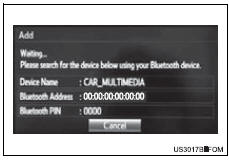
- Register the bluetooth® device using your bluetooth® device.
A pin-code is not required for ssp (secure simple pairing) compatible bluetooth® devices. Depending on the type of bluetooth® device being connected, a message confirming registration may be displayed on the bluetooth® device’s screen. Respond and operate the bluetooth® device according to the confirmation message.
- Check that this screen is displayed when registration is complete.

- Select “ok” when the connection status changes from “connecting...” To “connected”.
If an error message is displayed, follow the guidance on the screen to try again.
Registration can be performed from screens other than the “bluetooth* setup” screen.
When registering from the “bluetooth* audio” screen- Display the “bluetooth* audio” screen
- Select “select device”.
- Follow the steps in “how to registering a bluetooth® device” from 2
*: Bluetooth is a registered trademark of bluetooth sig, inc.
Deleting a bluetooth® device- Display the “bluetooth* setup” screen.
*: Bluetooth is a registered trademark of bluetooth sig, inc.
- Select “remove”.
- Select the desired device.
- A confirmation message will be displayed, select “yes” to delete the device.
- Check that a confirmation screen is displayed when the operation is complete.
Test yourself
A quick Toyota RAV4 quiz: every answer comes with an explanation and a link to the manual page.